MXM Player
One instrument, 16 steps, and a chain of effects. Nice and simple.
MXM Player is working as my everyday project tool. Packaging and platform checks are still to come.
What it does
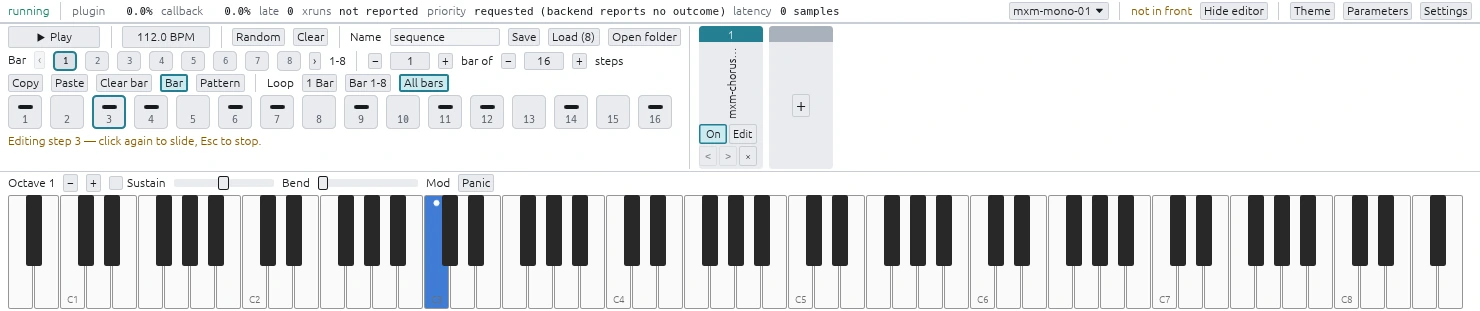
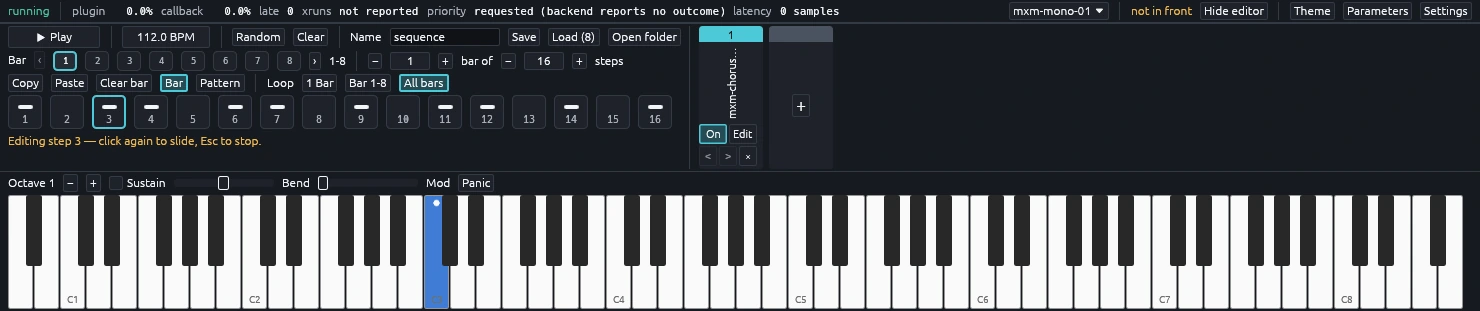
MXM Player is a small CLAP host I made alongside the synths. It loads the real .clap bundles, so I can play and test the exact plugins that will ship.
Play with the on-screen keys, your computer keyboard, or a MIDI controller. You can open each plugin’s own editor, or use the player’s plain parameter panel when a plugin has no editor.
The sequencer
The sequencer has 16 steps. Each step can rest, play a note, or tie into the next one.
Select a step, move a plugin control, and that value is locked to the step. You can lock up to 32 parameters and reset any one with a double-click. The locks stay with the instrument that made them, even when you load something else for a while.
The effect chain
Add effects after the instrument, drag them into order, open their editors, or switch them off. The chain handles mono and stereo plugins and keeps effect tails alive after the instrument goes quiet.
There are no sends, buses, or complicated routing. It is for getting an idea going quickly, not replacing your DAW.
Command-line control
The player also comes with a local command-line client. It can load plugins, change parameters, edit steps, run the transport, manage effects, export audio, and return the whole player state as JSON.
I use the same commands for automated tests and for AI-assisted sessions. They control the normal app rather than a hidden test version.
Status
| Current state | |
|---|---|
| Product | Separate from the plugins, with its own version |
| Target systems | Windows, macOS, Linux |
| Plugin format | CLAP |
| Plugin editors | Floating windows |
| Audio routing | One instrument into one serial effect chain |
| Device audio input | Not supported |
| Release | In development |
Plugins run inside the player, so a native plugin crash can stop it too. It catches what it can, but it is not a sandbox.