MXM Mono 08 manual
Source code on GitHub · Questions on Discord
This manual goes through MXM Mono 08 card by card, then explains the routes and the triggers. What every MXM editor shares, such as presets, pages, zoom, themes and the keys, is in Using the MXM editors.

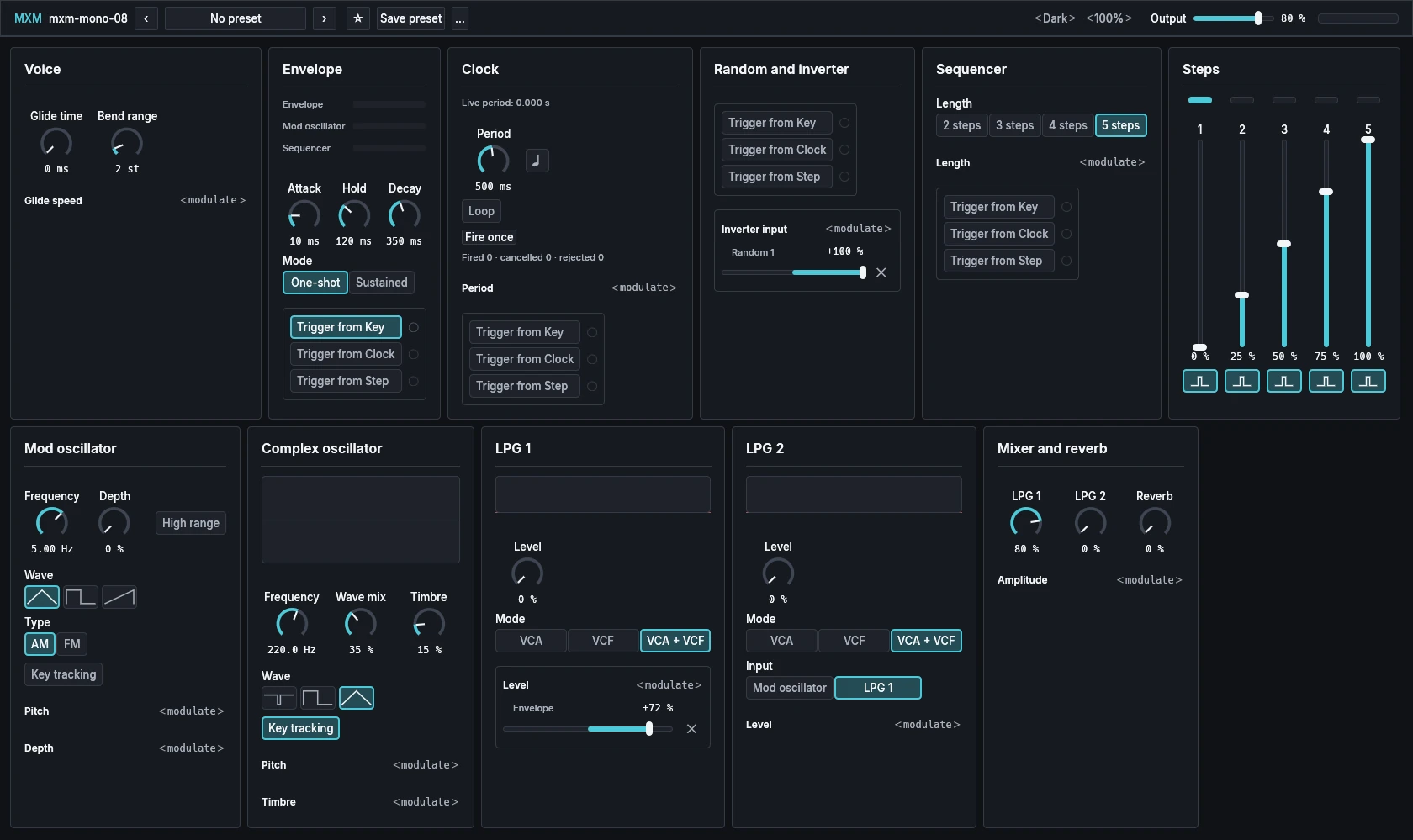
All 11 cards fit on one page at the opening size. In a smaller window, pairs such as the two oscillators stay side by side while they fit.
App bar
From the left: the plugin’s name, the preset row, Theme and Scale, Output and a level meter whose clip light stays on until you click it.
| Control | Range | Init |
|---|---|---|
| Output | 0 % to 100 % | 80 % |
Voice
| Control | Range | Init |
|---|---|---|
| Glide time | 0 ms to 10.00 s | 0 ms |
| Bend range | 0 st to 24 st | 2 st |
Glide time is how long the pitch takes to move one octave; the glide is linear. Bend range sets how far the pitch-bend lever reaches, on every oscillator whose Key tracking is on.
Glide speed takes routes, which speed the glide up, to as much as five times. A route pulling the other way doesn’t slow it below Glide time. Nothing is patched at Init.
Envelope
| Control | Range | Init |
|---|---|---|
| Attack | 2 ms to 10.00 s | 10 ms |
| Hold | 2 ms to 10.00 s | 120 ms |
| Decay | 2 ms to 10.00 s | 350 ms |
| Mode | One-shot, Sustained | One-shot |
| Trigger from Key | Off, On | On |
| Trigger from Clock | Off, On | Off |
| Trigger from Step | Off, On | Off |
The envelope rises over Attack and falls back to zero over Decay. On One-shot, each trigger runs the whole shape, staying at full for Hold, however long the key is held. On Sustained it stays at full while the key is held and then decays.
The three trigger switches decide what fires it (see Triggers), and the light beside each flashes when it fires.
The three bars at the top of the card show the live levels of the envelope, the mod oscillator and the sequencer.
Clock
| Control | Range | Init |
|---|---|---|
| Period | 2 ms to 10.00 s | 500 ms |
| Sync | Off, On | Off |
| Loop | Off, On | Off |
| Trigger from Key | Off, On | Off |
| Trigger from Clock | Off, On | Off |
| Trigger from Step | Off, On | Off |
Period is the time between the clock’s beats. With Sync, the note symbol, on and a host tempo, Period picks a note length from 1/64 to 4 bars, as far as the range reaches at that tempo.
Loop keeps the clock going once it has started, but doesn’t start it: something has to fire it first, a trigger switch or Fire once. Trigger from Clock does the same as Loop.
Fire once is a button, not a setting. It fires the clock by hand and is never saved, so loading a sound can never start the clock. Up to 64 presses can wait their turn; past that, Request queue full appears. The captions show the live period and how many requests were fired, cancelled and rejected.
Period takes routes. A positive amount shortens the period, by up to 95 % at full. Negative totals are ignored. Nothing is patched at Init.
Random and inverter
| Control | Range | Init |
|---|---|---|
| Trigger from Key | Off, On | Off |
| Trigger from Clock | Off, On | Off |
| Trigger from Step | Off, On | Off |
Every time this card is fired, it draws four new random levels, Random 1 to 4, and holds them until the next trigger. They are four separate sources in the route menus.
The Inverter’s output is full scale minus whatever is routed into Inverter input, kept between zero and full. Any source but the Inverter itself can feed it. At Init it holds Random 1 at +100 %, which changes nothing you hear until you route the Inverter somewhere.
Sequencer
| Control | Range | Init |
|---|---|---|
| Length | 2 steps, 3 steps, 4 steps, 5 steps | 5 steps |
| Trigger from Key | Off, On | Off |
| Trigger from Clock | Off, On | Off |
| Trigger from Step | Off, On | Off |
Each trigger moves the sequencer on one step, and at Init nothing does, so turn on a trigger switch to run it. Length is how many of the five steps it plays; shortening it never erases a step.
Length takes routes, adding up to three steps either way at full, rounded and kept between two and five.
Steps
| Control | Range | Init |
|---|---|---|
| 1 | 0 % to 100 % | 0 % |
| 2 | 0 % to 100 % | 25 % |
| 3 | 0 % to 100 % | 50 % |
| 4 | 0 % to 100 % | 75 % |
| 5 | 0 % to 100 % | 100 % |
| Step 1 to 5 trigger | Off, On | On |
Five columns, each a fader for the step’s level with a trigger switch below it. The level goes out as the Sequencer source for as long as the step is active. A step with its trigger on also sends a step trigger as it becomes active. A step with its trigger off still plays its level; it is not skipped.
The markers above the columns show which step is playing.
Mod oscillator
| Control | Range | Init |
|---|---|---|
| Frequency | 0.16 Hz to 50.00 Hz | 5.00 Hz |
| Depth | 0 % to 100 % | 0 % |
| High range | Off, On | Off |
| Wave | Triangle, Square, Sawtooth | Triangle |
| Type | AM, FM | AM |
| Key tracking | Off, On | Off |
Frequency is the mod oscillator’s speed: slow for movement, or a tone with High range on. High range multiplies it by 88, so the knob then reads 14.1 Hz to 4400.0 Hz and Init’s 5.00 Hz becomes 440.0 Hz. Depth is how strongly it acts.
Type decides what it does to the complex oscillator. AM moves its volume, tremolo when slow and bell-like tones when fast. FM moves its pitch, vibrato when slow and bright metallic tones when fast. Key tracking lets the keys play the mod oscillator, measured from middle C.
Pitch and Depth take routes. Nothing is patched at Init.
Complex oscillator
| Control | Range | Init |
|---|---|---|
| Frequency | 27.5 Hz to 1760.0 Hz | 220.0 Hz |
| Wave mix | 0 % to 100 % | 35 % |
| Timbre | 0 % to 100 % | 15 % |
| Wave | Spike, Square, Triangle | Triangle |
| Key tracking | Off, On | On |
With Key tracking on, Frequency is the pitch of the A above middle C, so at Init’s 220.0 Hz the instrument plays an octave below concert pitch. With it off the oscillator holds its Frequency whatever you play.
Wave mix moves the shape from a sine toward the chosen Wave: a sharp, bright spike, a hollow square or a soft triangle. Timbre adds harmonics on top. The display draws the waveform as it plays.
Pitch takes routes. One from the mod oscillator or from the complex oscillator itself gives FM. Timbre takes routes too. Nothing is patched at Init.
LPG 1
| Control | Range | Init |
|---|---|---|
| Level | 0 % to 100 % | 0 % |
| Mode | VCA, VCF, VCA + VCF | VCA + VCF |
A low-pass gate: opened, the sound gets brighter and louder together. Mode chooses how. VCA opens in volume only and the tone stays as bright. VCF opens as a filter, darker when closed and brighter as it opens; it never closes completely, so for notes that start and stop use one of the other two. VCA + VCF does both at once, and rings like a struck object, its brightness falling faster than its level. The display draws the gate’s response.
Level is 0 % at Init, so the gate is shut until something opens it. Level takes routes, and at Init it holds the Envelope at +72 %: that is what makes each key sound.
LPG 2
| Control | Range | Init |
|---|---|---|
| Level | 0 % to 100 % | 0 % |
| Mode | VCA, VCF, VCA + VCF | VCA + VCF |
| Input | Mod oscillator, LPG 1 | LPG 1 |
A second gate, like the first. Input decides what it plays: the mod oscillator as a sound source, or what comes out of LPG 1, for a second stage. The mod oscillator’s audio is AC-coupled on its way in here, while as a control source it keeps its DC.
Level takes routes. Nothing is patched at Init.
Mixer and reverb
| Control | Range | Init |
|---|---|---|
| LPG 1 | 0 % to 100 % | 80 % |
| LPG 2 | 0 % to 100 % | 0 % |
| Reverb | 0 % to 100 % | 0 % |
The two gates’ levels in the mix, and how much spring reverb follows. LPG 2 is mixed at opposite polarity to LPG 1, so with equal settings the two cancel. The spring is mono and comes after the mix.
Amplitude takes routes. It scales the mix before the spring, from silence to double, and cannot open a gate that is shut. Nothing is patched at Init.
Routes
Every modulation in MXM Mono 08 is a route from a source to a destination. The 11 destinations are the ones described card by card above: Glide speed, Period, Inverter input, Length, Pitch on both oscillators, Depth, Timbre, both gates’ Level and Amplitude. There are 15 sources:
- Key: the played note after glide, tuning and bend, measured from middle C
- Pressure, channel or per note
- Mod oscillator and Envelope
- Clock ramp, the clock rising through each period
- Sequencer, the level of the playing step
- Random 1, Random 2, Random 3, Random 4 and Inverter
- Velocity, Wheel (CC 1) and Bend
- Complex oscillator, its audio, for FM
Click ‹ modulate › under a destination and choose a source. It becomes a row with a fader and a × that removes it, and a removed route keeps its amount for when you add it again. Each fader reads what the route delivers in the destination’s own unit, and a Key route reads per octave of keyboard. In the table, the control sources are Pressure, Mod oscillator, Envelope, Clock ramp, Sequencer, the four Randoms and Inverter:
| Destination | Full reach |
|---|---|
| Complex pitch | ±60.00 st from the control sources and the complex oscillator; ±12.00 st from Velocity, Wheel or Bend; ±12.00 st per octave from Key |
| Mod pitch | ±96.00 st from the control sources; ±12.00 st from Velocity, Wheel or Bend; ±19.20 st per octave from Key |
| Timbre, Depth, LPG levels, Inverter input, Amplitude | ±100 %; ±20 % per octave from Key |
| Glide speed | ±4.00 x speed; ±0.80 x speed per octave from Key |
| Period | −95 % period at +100 %; −19 % period per octave from Key |
| Length | ±3.00 steps; ±0.60 steps per octave from Key |
From the control sources, the pitch faders are finer near the middle, so small vibrato amounts sit at the start of the travel.
A few pairs offer only the half that does something. Velocity into Period, Glide speed or Inverter input runs from −100 % to 0 %, and Wheel into those three from 0 % to +100 %. Velocity into either gate’s Level runs from 0 % to +100 %.
Velocity reads zero at the hardest note, so a velocity route does nothing until you play softer. Routes from the complex oscillator, and any route that runs backwards through the patch, arrive one sample late. The sequencer can change the clock’s period within the same sample, so patching Sequencer into Period makes each step set the tempo of the clock that moves it on.
In a host each route is two parameters, such as “Complex timbre from Envelope” for the amount and “Complex timbre from Envelope on” for whether it is there.
Triggers
Triggers are separate from routes. The Envelope, the Clock, the Sequencer and the random levels each have three switches, Trigger from Key, Trigger from Clock and Trigger from Step, and any switch that is on fires the module. Key is a key going down, Clock is the clock reaching the end of its period, and Step is a step with its trigger on becoming active.
At Init only the Envelope’s Trigger from Key is on. In a host the switches are named like “Envelope trigger from Key”.
Playing notes
MXM Mono 08 has one voice with last-note priority. Let go of a later key and the voice glides back to the earlier one still held, without starting the envelope again. Per-note tuning and pressure from the host are matched to the note they belong to.
Velocity, pressure and the mod wheel change nothing until routed. All Sound Off clears held notes, the reverb’s tail and anything running by itself, and the next note starts fresh rather than gliding from an old pitch.