mxm-mono-03 manual

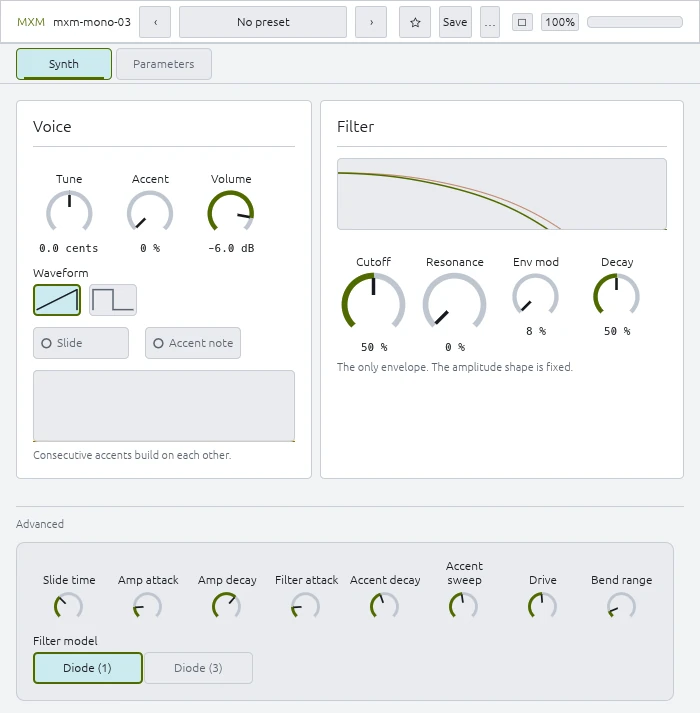
Nineteen parameters. Eleven on the panel and eight behind the Advanced disclosure, where every one opens on the value the Roland TB-303 fixed in hardware — so Init is the machine, and opening Advanced changes nothing until you move something.

Every parameter is automatable and reachable from a host’s per-step modulation. Ranges and Init values below are read from the plugin itself.

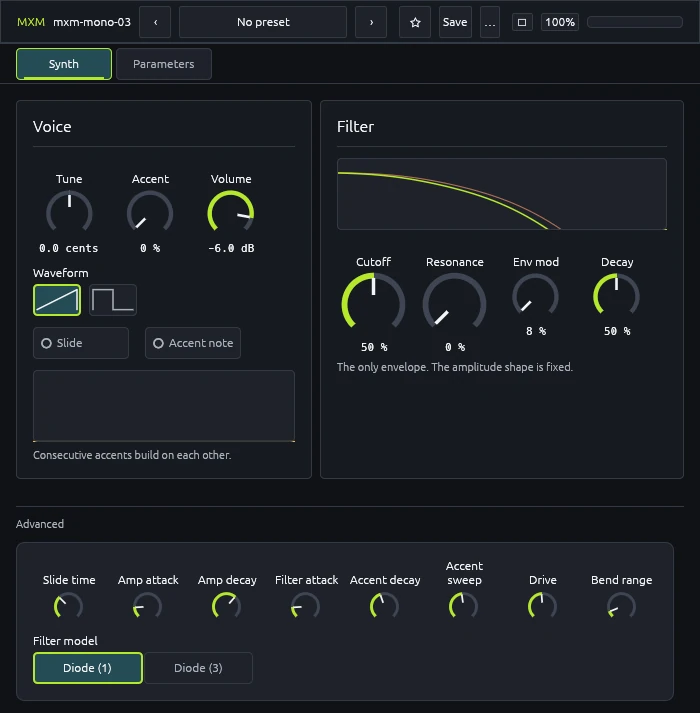
The Synth view. The Advanced area sits below the two modules and is open by default The Synth view. The Advanced area sits below the two modules and is open by default
The Synth view. The Advanced area sits below the two modules and is open by default · click for full size

Oscillator

Tune — −100 … +100 cents, Init 0.0 cents

Detunes the whole instrument. It is an offset, not a pitch control: the keyboard still decides the note, and this shifts every note by the same amount. Useful for sitting against a recording that is not at concert pitch, or for beating against a second bass line.

Waveform — Sawtooth or Square, Init Sawtooth

One waveform at a time, as the hardware has it. This is deliberately not a blend — a continuous morph is a strict superset that reaches timbres the machine cannot, which is the argument against it here.

The square is not an independent oscillator: it is shaped from the same saw, and its duty cycle changes with pitch — broad at the bottom of the keyboard, close to even at the top. Low square notes are therefore fuller than a mathematically perfect 50 % pulse would be, and that asymmetry is part of the sound rather than an artefact.

Bend range — 0 … 24 st, Init 2 st

How far pitch bend travels, in semitones. An addition rather than a model of anything: it is the MIDI-era equivalent of a control the hardware offered its own way. Set it once for your setup and leave it.

Filter

The diode ladder is the instrument. Four uneven poles rather than a matched set, which is where the cutoff’s sag comes from and why self-oscillation arrives higher up the control than a neat four-pole model would put it.

Cutoff — 0 … 100 % (60 Hz … 4 kHz), Init 50 % (about 490 Hz)

Where the ladder sits. The control spans roughly 60 Hz to 4 kHz exponentially, so equal movements give equal musical intervals across the range.

It reads as a position, not a frequency, and that is a considered decision rather than an omission. Labelling it in hertz would mean running the model at roughly eight times the displayed value for the reading to match the −3 dB point, and the widest pole then caps the whole control in the high hundreds of hertz. The hardware’s own control carries no markings either.

This and Resonance are the two controls a hand keeps moving; everything else sets up the shape they move through.

Resonance — 0 … 100 % (self-oscillates from about 87 %), Init 0 %

Feedback around the ladder. Bass thins as it climbs and the loss is not compensated inside the filter — the droop is the topology, and correcting it there would stop the filter being the thing it models. A fixed makeup gain after the filter recovers the level without touching the loop.

Near the top of the control the ladder self-oscillates. The top of the travel reaches about 1.15× the ladder’s own threshold, which puts the onset near 87 %; from 90 % up the filter is seeded with an inaudible excitation so it can sing from silence rather than needing a note to start it. Because the poles are uneven, that onset sits higher than a textbook ladder would suggest, and the resonant peak stays broader on the way up.

Env mod — 8 … 100 % (0.4 … 5 octaves), Init 8 % (about 0.4 octaves)

How far the filter envelope moves the cutoff.

The envelope opens the filter multiplicatively, in octaves, so a given depth means the same musical distance wherever Cutoff sits. At full depth it lifts the cutoff by up to 5 octaves; at the 8 % floor, by about 0.4 of one.

That floor is 8 %, not zero, and it is the one place this instrument breaks the collection’s rule that every amount starts at zero. The hardware’s circuit cannot turn envelope depth all the way off, so neither does this. A patch with Env mod at its minimum still has some sweep in it; if you want none, shortening the decay is the way there.

Decay — 0 … 100 % (200 ms … 2.00 s), Init 32 % (about 420 ms)

The filter envelope’s decay — how long each note’s sweep takes to fall back. The panel shows a percentage, because the hardware’s control is unmarked; underneath, the map is exponential, so the travel is even in perceived time rather than spending most of itself at the long end.

This is the control the pattern is performed with, alongside Cutoff and Resonance. Short values give the clipped, percussive line; long values let consecutive notes blur into one another.

An accented note ignores this entirely and uses Accent decay instead, which is why an accent sounds tighter as well as louder.

Accent

Accent reaches three places at once, and that is what makes it more than a velocity control. It raises the level, it forces the shorter envelope, and it charges a second sweep whose charge does not reset at the note boundary.

Consecutive accented notes therefore climb — each one starts from where the last left off. The panel shows the stored charge for exactly this reason: the knob has not moved, but the next note is brighter, and without a readout that looks like a fault.

Accent — 0 … 100 % (0 … 4 octaves of cutoff), Init 0 %

How hard an accent hits. This is the hardware’s knob and a setting for the whole patch, not for a note. On its own it does nothing — a note also has to be marked accented.

Like Env mod it works in octaves, adding up to 4 octaves of cutoff on top of whatever the filter envelope is already contributing.

Accent note — Off or On, Init Off

Whether this note is accented. The hardware’s per-step button, exposed as a parameter so a host’s per-step modulation can reach it.

Two controls rather than one, because a single parameter cannot be both. Turning a depth knob up would accent every note, which the machine does not do: the depth belongs to the patch, the flag to the step.

Slide

Slide — Off or On, Init Off

Whether this note slides in from the one before.

It engages the pitch lag and nothing else. Whether the envelopes retrigger follows the gate, which is the host’s business: a tied note holds the gate open so the envelopes do not restart, and that combination — lag plus held gate — is the sound people mean by a slide. A slide without a tie gives two notes with a bend between them, which is a different and much more ordinary sound.

There is no time control here because the hardware has none; its slide time is a fixed RC in the pitch path and the button is simply on or off. Slide time under Advanced opens that constant up.

Output

Volume — −60.0 … 0.0 dB, Init −6.0 dB

Output level, taken after the amplifier.

No distortion follows it. The TB-303’s own voice had none — the overdriven sound on the records came from pedals in front of an amplifier, not from the machine — so drive belongs in a separate effect where you can choose it rather than baked in here.

Advanced

The constants the circuit fixed, opened up. Each defaults to the hardware’s own value, so Init is still the machine. None of them is smoothed: a constant is not a signal.

Slide time — 5 … 500 ms, Init 60 ms

How long the pitch lag takes. 60 ms is the hardware’s value, set there by an RC in the pitch path. Shorter turns the slide into a fast portamento; longer lets one span most of a step at moderate tempos.

Amp attack — 0 … 500 ms, Init 3 ms

The amplitude envelope’s attack. On the hardware this is a de-clicker rather than a shape — it exists so notes do not pop — and here it is made adjustable. Raising it takes the edge off the front of each note, which the filter envelope cannot do on its own.

Amp decay — 30 ms … 10.00 s, Init 3.00 s

The amplitude envelope’s decay, and the big one.

At its default the amplitude barely moves within a note, which is why every note is flat-topped and why the filter, not the amplitude, carries all the movement in this instrument. Shorten it and you get a plucked, gated line that no amount of filter work will restore.

Filter attack — 0 … 500 ms, Init 3 ms

The filter envelope’s attack. Lets the filter swell instead of only snapping — a slower attack turns each note’s sweep into a rise and fall rather than an immediate fall.

Accent decay — 20 ms … 2.00 s, Init 200 ms

The decay an accented note is forced to, overriding Decay for that note. This is the mechanism behind an accent sounding tighter as well as louder; widening the gap between this and Decay makes accents stand further out.

Accent sweep — 0.15 … 4.00 ×, Init 1.00 ×

Stretches the accent sweep’s time constants together — the rate at which consecutive accents climb, and how long the charge takes to bleed away between them. Lower values make a run of accents pile up faster; higher values make the climb gradual.

Drive — 0.5 … 24.0 ×, Init 6.0 ×

How hard the oscillator drives the filter.

This is not a distortion stage bolted on. Measurements of the ladder show that with resonance up, 8.75 units of input buy 0.5 of output — it is a filter you have to drive hard to hear at all, so the drive is part of the instrument rather than an effect in front of it. The hardware has no control for it, which is why it sits here and opens on the hardware’s value.

Filter model — Diode (1) or Diode (3), Init Diode (1)

Which diode ladder configuration the filter models.

The Parameters view

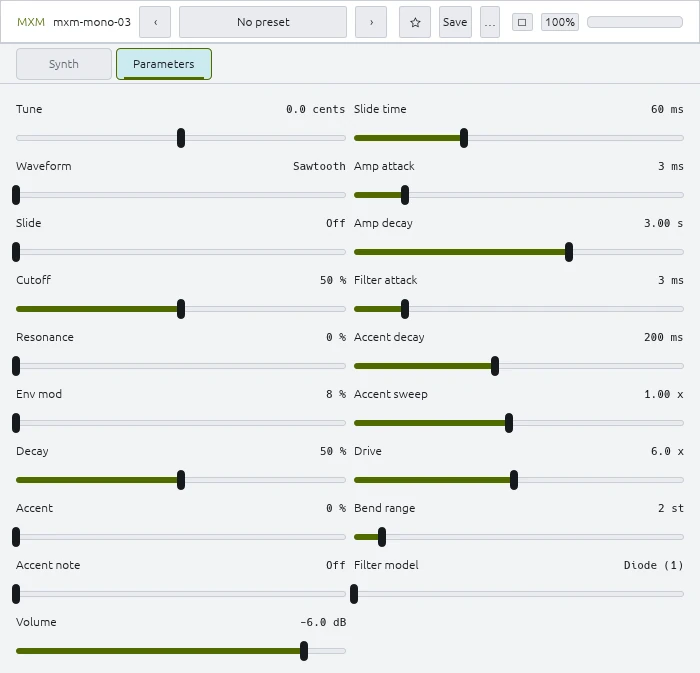
Every control on one page as an editable slider, with direct text entry. It is the same parameters as the panel, laid out for reading and for typing an exact value rather than for playing.

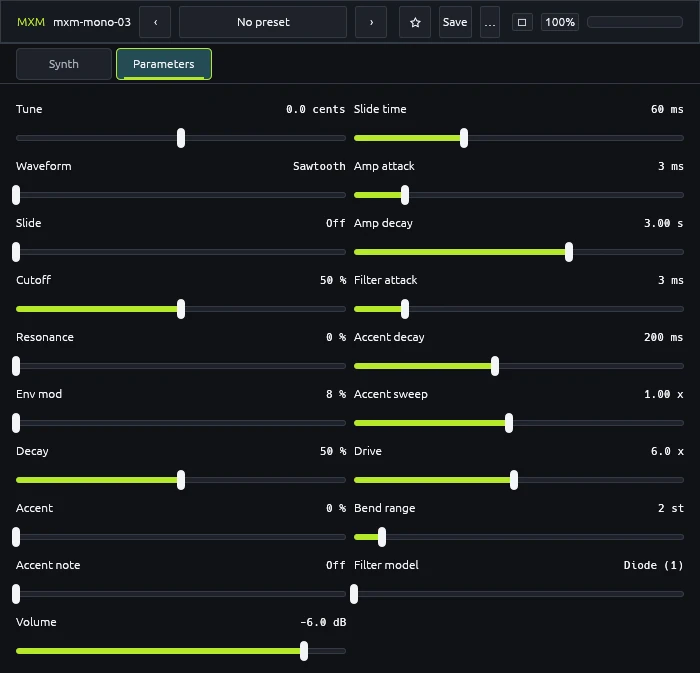
The Parameters view: all 19 controls The Parameters view: all 19 controls
The Parameters view: all 19 controls · click for full size