MXM Model Drums manual
Source code on GitHub · Questions on Discord
This manual goes through MXM Model Drums card by card. What every MXM editor shares, such as presets, pages, zoom, themes and the keys, is in Using the MXM editors. The first page holds the slots and the LFOs. The second edits the selected slot, and its knobs change with that slot’s model. They read in the model’s own units: semitones, decibels, or times the real drum, and at Init each sits at the real drum. Your DAW, and a typed value, see the same knob as a percentage from −100 to 100, with 0 at Init.

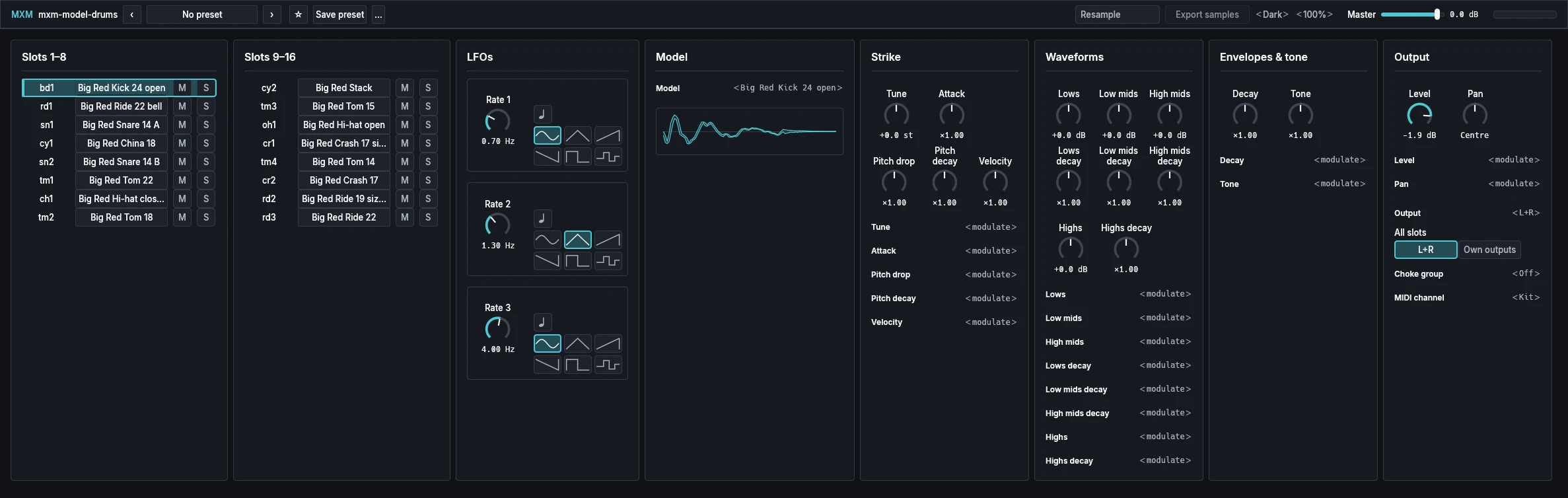
App bar
From the left: the plugin’s name, the preset row, Resample and Export samples, Theme and Scale, Master, and a level meter whose clip light stays on until you click it. In a narrow window, Resample and Export samples move into the … menu.
| Control | Range | Init |
|---|---|---|
| Master | −60.0 dB to +6.0 dB | 0.0 dB |
| Resample | Off, On | Off |
| Export samples | Button |
Master is the level of the whole kit, on every output.
Resample plays every slot from a recording of itself, made each time you turn it on. In our measurement on the Init kit it cost about a ninth of playing live. Tune and Decay still work while it is on. To change anything else, turn it off, edit, and turn it on again.
Export samples is grey until Resample is on and ready, because a pack is the samples you are hearing. It asks for a folder and writes the kit there as numbered 24-bit WAV one-shots at 48 kHz, with a kit.txt. It never writes over an existing pack, and it tells you how many samples it wrote and how many clipped.
Slots 1–8 and Slots 9–16
Eight rows on each card, one per slot. These controls repeat on all 16 rows.
| Control | Range | Init |
|---|---|---|
| Name | Text | A made-up name, such as bd1 |
| Model | 58 models | See the Init kit below |
| M (Mute) | Off, On | Off |
| S (Solo) | Off, On | Off |
Click a slot’s model button to strike it at velocity 100 and select it for editing. M silences a slot without cutting off its ring. S lets you hear a slot on its own, and selects it too. Mute wins over Solo.
Each name is made up from the model’s kind and a count, such as bd1 for the first kick or oh1 for an open hi-hat. Double-click a name to type your own, Enter to keep it, Escape to cancel. An empty name follows the model again. Typed names are saved with your project, never in a kit, and loading a kit clears them. Your DAW gets each slot’s name on its key, so its drum lanes read bd1, sn1 or your own name.
The Init kit, with the two hi-hats in choke group 1:
| Note | Slot | Name | Model | Level |
|---|---|---|---|---|
| 36 | 1 | bd1 | Big Red Kick 24 open | −1.9 dB |
| 37 | 2 | rd1 | Big Red Ride 22 bell | −30.5 dB |
| 38 | 3 | sn1 | Big Red Snare 14 A | −0.2 dB |
| 39 | 4 | cy1 | Big Red China 18 | −35.4 dB |
| 40 | 5 | sn2 | Big Red Snare 14 B | −1.0 dB |
| 41 | 6 | tm1 | Big Red Tom 22 | −8.7 dB |
| 42 | 7 | ch1 | Big Red Hi-hat closed | −19.3 dB |
| 43 | 8 | tm2 | Big Red Tom 18 | −7.9 dB |
| 44 | 9 | cy2 | Big Red Stack | −36.3 dB |
| 45 | 10 | tm3 | Big Red Tom 15 | −9.9 dB |
| 46 | 11 | oh1 | Big Red Hi-hat open | −27.0 dB |
| 47 | 12 | cr1 | Big Red Crash 17 sizzle | −34.7 dB |
| 48 | 13 | tm4 | Big Red Tom 14 | −7.0 dB |
| 49 | 14 | cr2 | Big Red Crash 17 | −22.4 dB |
| 50 | 15 | rd2 | Big Red Ride 19 sizzle | −30.0 dB |
| 51 | 16 | rd3 | Big Red Ride 22 | −29.2 dB |
LFOs
Three LFOs for the whole kit, one row each, which every slot can use as route sources.
| Control | Range | Init |
|---|---|---|
| Rate 1 | 0.05 Hz to 20.00 Hz | 0.70 Hz |
| Rate 2 | 0.05 Hz to 20.00 Hz | 1.30 Hz |
| Rate 3 | 0.05 Hz to 20.00 Hz | 4.00 Hz |
| Sync (beside each rate) | Off, On | Off |
| Shape (beside each rate) | Sine, Triangle, Ramp up, Ramp down, Square, Sample & hold | Sine, Triangle, Sine |
Sync is the note button beside each rate. With it on, the knob picks a note length of the host’s tempo, from 1/32 to four bars. Sample & hold takes a new random value on every cycle. A drum reads its knobs when it is struck, so an LFO on a knob gives each hit the value it had at that moment.
Model
| Control | Range | Init |
|---|---|---|
| Model | 58 models | See the Init kit |
Choose the drum for the selected slot, and hover over the selector for a sentence on it. The display draws the slot’s sound at its current settings, from the real sound engine: the first 80 ms in detail, then the rest of the ring up to 2 s, squeezed in.
The selector lists the models in a fixed order. Here they are by drum:
| Model | What it is |
|---|---|
| Ringing kick | An open kick with a long, low ring and a second skin under the beater |
| Snare | A sharp crack, a ringing head and the snares’ buzz |
| Damped kick | A worn kick with a pillow inside: a short, dry thump |
| Big Red Kick 24 open | A deep thump that falls in pitch into a long low ring |
| Big Red Snare 14 A, B | A deep wired snare with a ringing body; B has a sharper attack |
| Big Red Snare 14 rimshot, edge, sidestick, rim click | Head and rim at once; off the centre; the stick laid on the head; the rim alone |
| Big Red Tom 14, 15, 18, 22 | A short, singing rack tom; a little lower and longer; a low, round floor tom; a very low one with a long ring |
| Big Red Tom 14, 15, 18, 22 rim click | A hollow knock, deeper on the larger toms |
| Big Red Hi-hat closed, quarter-open, half-open, open | A tight chick, then wider and washier as the hats open |
| Big Red Hi-hat foot chick, foot splash | The pedal closing the hats; the pedal pressed and let go |
| Big Red Crash 17, Crash 17 sizzle | A bright splash; with sizzles, a long rattling wash |
| Big Red Ride 22, Ride 22 bell, Ride 22 edge | A ping over a long wash; the bell; a broad crash of the ride |
| Big Red Ride 19 sizzle, Ride 19 sizzle edge | A ping inside a long rattle; a broad wash |
| Big Red China 18, Stack | A trashy, explosive crash; three stacked cymbals, short and cutting |
| Big Red Crash 17 choke, Crash 17 sizzle choke, China 18 choke | The cymbal struck and grabbed by the hand |
| Mallet models: Snare 14, the four toms, both crashes, both rides, China 18 | A felt mallet: round thumps and slow swells |
| Brush models: Snare 14, the four toms, Hi-hat closed and open, both crashes, both rides, China 18 | A wire brush: swishes, taps and light washes |
The three synthesized drums restart when hit again, the cut ring fading over 5 ms. The Big Red models ring on (see Playing). The three chokes are struck at one strength, so on them velocity sets only the level.
Strike
| Control | Range | Init |
|---|---|---|
| Tune | −24.0 st to +24.0 st | +0.0 st |
| Attack | ×0.12 to ×8.00 | ×1.00 |
| Click (Ringing kick only) | Off to +12.0 dB | +0.0 dB |
| Pitch drop | ×0.00 to ×4.00 | ×1.00 |
| Pitch decay | ×0.12 to ×8.00 | ×1.00 |
| Velocity | ×0.00 to ×4.00 | ×1.00 |
Tune tunes the whole drum, every ring with it, as a head’s tension does. Attack is how hard it is struck: a faster rise and a sharper strike. Click is the Ringing kick’s beater tick. Pitch drop is how far the pitch falls at the strike, none at the bottom, and Pitch decay how quickly it settles.
Velocity is how far a soft hit moves from a hard one. At ×0.00 only the level follows velocity. On the Ringing kick a softer hit is lower and darker, with less beater, and on the Damped kick it is rounder, darker and more damped. Many Big Red models hide Pitch drop, Pitch decay or Velocity, because they don’t use them.
Tune, Attack, Pitch drop, Pitch decay and Velocity, with Decay and Tone, mean the same in every model, so automation keeps its sense when a slot changes model.
Waveforms
The parts a model is made of, a level and a decay for each, named by the model.
| Control | Range | Init |
|---|---|---|
| Lows, Low mids, High mids, Highs (Big Red models) | Off to +12.0 dB | +0.0 dB |
| Lows decay, Low mids decay, High mids decay, Highs decay (Big Red models) | ×0.12 to ×8.00 | ×1.00 |
| Body, Skin, Ring (Ringing kick) | Off to +12.0 dB | +0.0 dB |
| Body decay, Skin decay, Ring decay (Ringing kick) | ×0.12 to ×8.00 | ×1.00 |
| Crack, Head, Shell, Ring (Snare) | Off to +12.0 dB | +0.0 dB |
| Crack decay, Head decay, Shell decay, Ring decay (Snare) | ×0.12 to ×8.00 | ×1.00 |
| Body, Overtone, Sub, Ring (Damped kick) | Off to +12.0 dB | +0.0 dB |
| Body decay, Overtone decay, Sub decay, Ring decay (Damped kick) | ×0.12 to ×8.00 | ×1.00 |
A Big Red model is split into four bands, lowest to highest. The three synthesized drums are split into their parts: on the Ringing kick, Skin is the short tones of a second skin at the strike; on the Snare, Head is the head’s own tone swelling just after the crack; on the Damped kick, Overtone sits an octave above the body and Sub is the beater’s low push. Each level turns its part off at the bottom, and each decay sets how long it lasts.
Noise
Hidden for every Big Red model.
| Control | Range | Init |
|---|---|---|
| Noise | Off to +12.0 dB | +0.0 dB |
| Noise decay | ×0.12 to ×8.00 | ×1.00 |
| Snares (Snare only) | Off to +12.0 dB | +0.0 dB |
| Snare decay (Snare only) | ×0.12 to ×8.00 | ×1.00 |
| Snare return (Snare only) | ×0.12 to ×8.00 | ×1.00 |
Noise is the ringing noise over the Ringing kick, the strike’s noise on the Snare and the beater’s slap on the Damped kick. Snares is the snares’ buzz, off at the bottom. Snare decay sets how long they buzz, and Snare return how late they come back after the strike.
Envelopes & tone
| Control | Range | Init |
|---|---|---|
| Decay | ×0.12 to ×8.00 | ×1.00 |
| Tone | ×0.12 to ×8.00 | ×1.00 |
Decay shortens or lengthens the whole ring, the Snare’s buzz with it. Tone darkens or brightens the drum.
Output
The selected slot’s output, then one row for the whole kit.
| Control | Range | Init |
|---|---|---|
| Level | −60.0 dB to +6.0 dB | The slot’s Init level |
| Pan | L 100% to R 100% | Centre |
| Output | L+R, 1 to 16 | L+R |
| All slots | L+R, Own outputs | L+R |
| Choke group | Off, 1 to 16 | Off (slots 7 and 11: 1) |
| MIDI channel | Kit, Ch 1 to Ch 16 | Kit |
Output sends the slot to the main stereo pair or to a mono output of its own, which your DAW sees as Slot 01 to Slot 16. A slot on its own output ignores Pan. All slots sets all sixteen at once, and lights neither choice when they differ. In a DAW that only takes stereo, every slot plays through the main pair.
Slots in the same choke group cut each other with a 5 ms fade: an open and a closed sound, or a long and a short one. An open hi-hat is closed the way a pedal closes it, its ring falling away as the closed hat damps.
On Kit, the slot plays from its own note. Set to a channel, it plays chromatically on that channel around note 60, with ±2 semitones of pitch bend. Output, MIDI channel and Resample belong to the instance in your project, so no kit changes them.
Routes
Every slot has four routes, each a source, a target and an amount. The sources:
- LFO 1, LFO 2 and LFO 3
- Wheel (CC 1) and Pressure (channel pressure)
- Velocity, zero at the hardest hit, so it moves the softer ones
- Random, a new value for each hit
A route can reach any knob the model shows, plus Level and Pan. Click ‹ modulate › under a knob to add a source. It becomes a row such as “Tune from LFO 1”, with an amount slider and a × that removes it. Removing a route keeps its depth, so adding the source back brings it back.
| Control | Range | Init |
|---|---|---|
| Amount (each route) | −100 to 100 | 0 |
At 100 a route moves a knob from its centre to one end, Pan from the centre to one side, and Level from silence to double. Negative amounts go the other way. Init has no routes. The knobs are read at the strike, so a route changes the next hit. Level and Pan follow their routes all the time.
Playing
The mod wheel and channel pressure reach the routes. MIDI CC 120 cuts every sound at once. CC 123 releases every note, as a note-off does, and the drums ring on. A bend or tuning that arrives while a drum rings reaches its next hit.
The Big Red models ring on, with up to twelve rings per slot. A quieter hit is added on top. Once a newer ring, past its first tenth of a second, is 3 dB louder than the older ones together, they fade out over 5 ms. A real stick on a ringing cymbal would also damp it, and we left that out. A silent kit costs almost nothing.