MXM Drum Machine manual
Source code on GitHub · Questions on Discord
This manual goes through MXM Drum Machine card by card. What every MXM editor shares, such as presets, pages, zoom, themes and the keys, is in Using the MXM editors. The two Slots cards and the LFOs card cover the whole kit, and every card after them edits the selected slot.

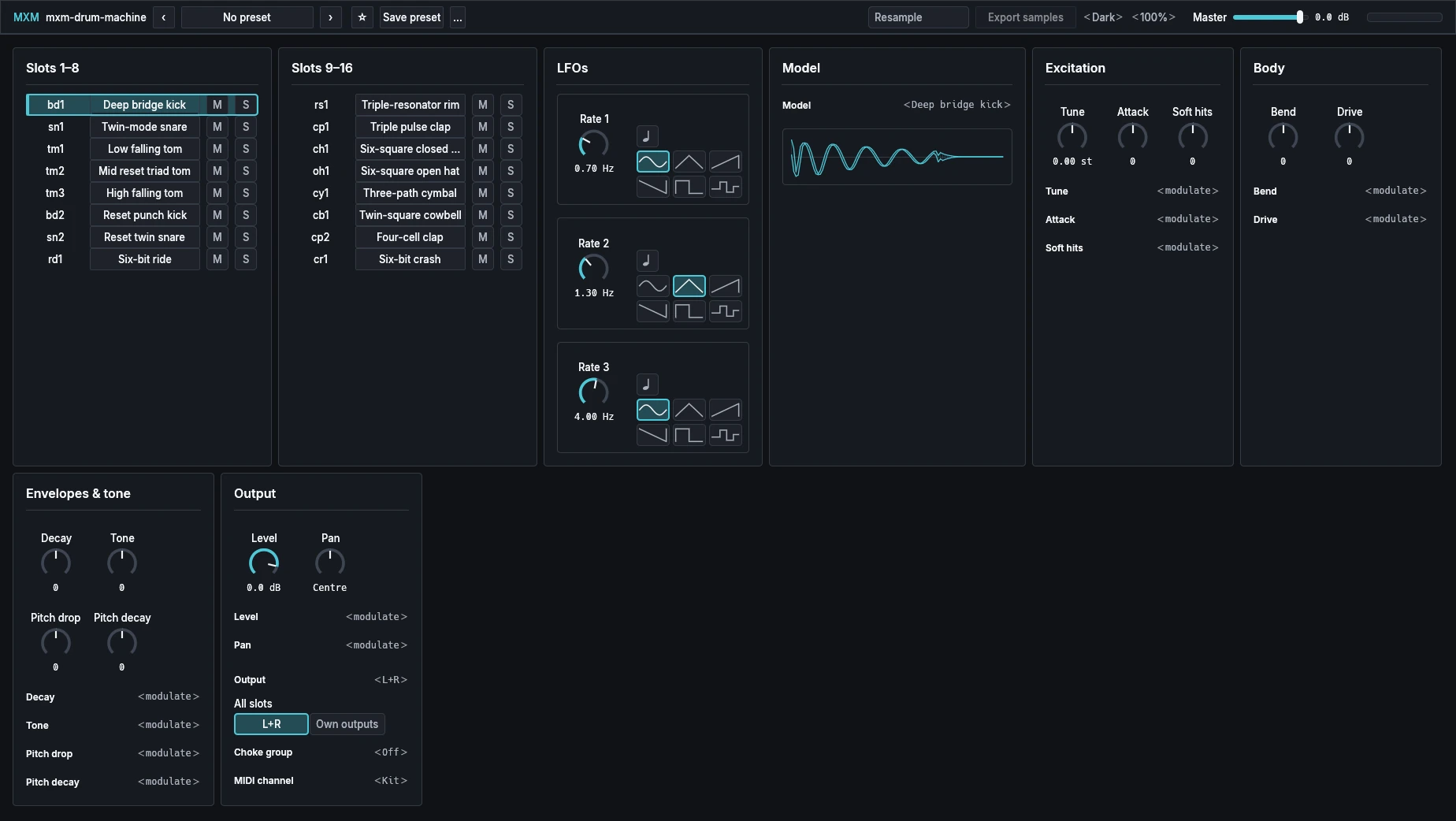
App bar
From the left: the plugin’s name, the preset row, Resample, Export samples, Theme and Scale, Master, and a level meter. In a narrow window, Resample and Export samples move into the … menu.
| Control | Range | Init |
|---|---|---|
| Resample | Off, On | Off |
| Export samples | Button | |
| Master | −60.0 dB to 6.0 dB | 0.0 dB |
Resample plays every slot from a recording of itself. Tune, Decay and Soft hits still work on the recording, and the other shaping knobs are greyed out; to change them, turn Resample off, edit, and turn it on again. It belongs to the instance, so no kit and no Init changes it.
Export samples asks for a folder and writes the kit into it as numbered 24-bit WAV one-shots, for a tracker or a sampler. It waits until Resample is on and its recording is finished, so you hear the hits before they leave. The files are 48 kHz whatever the host’s rate, at unity gain, centred, with Tune and Decay applied. The dialog opens on %LOCALAPPDATA%\mxm\sample-packs on Windows, ~/Library/Application Support/mxm/sample-packs on macOS and ~/.local/share/mxm/sample-packs on Linux, and an existing pack is never overwritten.
Master is the volume of the whole kit, on every output.
Slots 1–8
One row per slot, eight rows, for notes 36 to 43 in Kit mode.
| Control | Range | Init |
|---|---|---|
| Name box | Up to 32 characters | A name made from the model, such as bd1 |
| Model name | Button | The slot’s model |
| M | Off, On | Off |
| S | Off, On | Off |
The name box starts with a short name made from the model’s kind and its count in the kit, such as bd1 or ch1. Double-click it to type your own, Enter keeps it and Escape cancels, and an empty name follows the model again. Typed names are saved with the song, never in a kit, and loading a kit or Init clears them. The host is told each slot’s name, so a DAW can show it on the key.
Click the model name to select the slot and hear it, struck at velocity 100. A thin bar inside the button shows the slot’s level. M mutes the slot and S solos and selects it, both after the circuit, so tails carry on. When any slot is soloed, only soloed slots that aren’t muted sound.
At Init the slots hold a mixed kit of their own, in the layout shown under Playing notes, and the picture above shows which model each slot starts with.
Slots 9–16
The same row for slots 9 to 16, notes 44 to 51 in Kit mode.
LFOs
| Control | Range | Init |
|---|---|---|
| Rate 1 | 0.05 Hz to 20.00 Hz | 0.70 Hz |
| LFO 1 sync | Off, On | Off |
| LFO 1 shape | Sine, Triangle, Ramp up, Ramp down, Square, Sample & hold | Sine |
| Rate 2 | 0.05 Hz to 20.00 Hz | 1.30 Hz |
| LFO 2 sync | Off, On | Off |
| LFO 2 shape | as LFO 1 | Triangle |
| Rate 3 | 0.05 Hz to 20.00 Hz | 4.00 Hz |
| LFO 3 sync | Off, On | Off |
| LFO 3 shape | as LFO 1 | Sine |
Three LFOs for the whole kit, each a rate knob, a sync button with a note symbol and six drawn shapes. With sync on and a host tempo, the knob reads a note length from 4 bars to 1/32. The LFOs reach a drum only through its routes.
Model
| Control | Range | Init |
|---|---|---|
| Model | 94 models in nine families | Per slot |
The Model menu lists the models under nine bold family headings. Type to search it; the search stays until you clear it. Hover over the menu for a line about the current model. Below it, a sound trace draws two seconds of the drum, rendered from the actual model with the current settings.
| Family | Models |
|---|---|
| Bridge 808 | Deep bridge kick, Twin-mode snare, Low falling tom, Low falling conga, Mid falling tom, Mid falling conga, High falling tom, High falling conga, Layered short rim, Pure high clave, Bright short maraca, Triple pulse clap, Twin-square cowbell, Three-path cymbal, Six-square closed hat, Six-square open hat |
| Reset 909 | Reset punch kick, Reset twin snare, Low reset triad tom, Mid reset triad tom, High reset triad tom, Triple-resonator rim, Four-cell clap, Six-bit closed hat, Six-bit open hat, Six-bit crash, Six-bit ride |
| Economy 55 | Economy 62 kick, Economy body snare, Economy short rim, Inductor noise hat |
| Expanded 8000 | Dual-low kick, Dual-bridge snare, Diode low tom, Diode mid tom, Diode high tom, Diode low conga, Diode mid conga, Diode high conga, Thirty-millisecond rim, Six-square cymbal, Six-square short hat, Six-square long hat, Saw-noise clap, Phase-shift clave, Split-square cowbell |
| Compact 606 | Compact dual kick, Compact body snare, Compact low tom, Compact high tom, Two-band cymbal, Resonant closed hat, Tempo-coupled open hat |
| Snap 110 | Damped whack kick, LFSR snap snare, Mixed-source cymbal, Mixed-source closed hat, Mixed-source open hat, Timed-burst clap |
| Classic 78 | Classic 62 kick, Classic 340 snare, Five-millisecond rim, Sixty-millisecond noise hat, Long noise cymbal, Twenty-millisecond maraca, High 2630 clave, High 600 bongo, Low 400 bongo, Low 208 conga, Close-interval cowbell, Tambourine wash, Two-rate guiro, Triple high bell |
| Discrete 66 | Discrete 62 kick, Discrete 208 conga, Discrete low bongo, Discrete high bongo, Resonant 830 cowbell, Discrete short rim, Resonant 2350 clave, Bongo-body snare, Forty-millisecond noise hat, Forty-millisecond maraca, Four-hundred-millisecond cymbal |
| Early 2L | Early transistor kick, Early low conga, Early high conga, Early high bongo, Early cowbell, Early clave, Early snare, Early cymbal, Early maraca, Early wire brush |
The product page says which machine each family refers to. Slots from one family share what that machine’s circuits shared, such as the noise and metal banks.
Excitation
Excitation, Body and Envelopes & tone hold the selected slot’s shaping controls. A knob appears only if the slot’s model uses it, under the name that model gives it, so the set changes with the model. The tables give the general names. Every shaping control rests at zero, the model’s reference sound, and each knob has a ‹ modulate › line under it (see Routes).
| Control | Range | Init |
|---|---|---|
| Tune | −24.00 st to 24.00 st | 0.00 st |
| Attack | −100 to 100 | 0 |
| Soft hits | −100 to 100 | 0 |
Tune moves the drum up or down. Sixteen models have none, and the Two-rate guiro calls it Speed. Attack softens or sharpens the start of the sound. On 68 models it is Gain instead, which only makes the drum louder or softer, as Level does; others call it Soft start, Spread, Snappy length, Sizzle or Clap length. Soft hits is on every model: it brings soft hits up towards full ones, or down, away from them, and a full hit stays as it is.
Body
| Control | Range | Init |
|---|---|---|
| Body | −100 to 100 | 0 |
| Noise | −100 to 100 | 0 |
| Character | −100 to 100 | 0 |
Body changes the weight of the drum’s tonal body. Some models call it Gain, Punch, Drive or Bend, and 36 have none. Noise balances the noise in the sound; on the nine snares it is Snappy, how loud the snares are against the drum, and on 12 models it is Gain. Character changes the drum’s bite and colour, but never under that name: it is Drive, Crunch, Clean, Ring or Air, and 48 models don’t have it.
Envelopes & tone
| Control | Range | Init |
|---|---|---|
| Decay | −100 to 100 | 0 |
| Tone | −100 to 100 | 0 |
| Noise decay | −100 to 100 | 0 |
| Pitch drop | −100 to 100 | 0 |
| Pitch decay | −100 to 100 | 0 |
Decay and Tone are on every model. Decay shortens or lengthens the sound, and on the models that allow it, above zero runs past the stock length: up to 4.8 seconds on Deep bridge kick, twelve times the reference on Reset punch kick, and generally eight times. On the Tempo-coupled open hat it also follows the song’s tempo. Tone darkens or brightens the sound; Reset punch kick calls it Weight.
Noise decay shortens or lengthens the noise, on 22 models, as Snappy decay, Noise decay, Clap decay or Click length. Pitch drop is how far the pitch falls when the drum is struck. Ten models call it Pitch sweep, which also bends upwards below the centre. Pitch decay is how quickly the falling pitch settles, and on most models it acts only while Pitch drop or Pitch sweep is away from rest.
Deep bridge kick, for example, shows Tune, Attack and Soft hits, then Bend and Drive, then Decay, Tone, Pitch drop and Pitch decay.
Output
| Control | Range | Init |
|---|---|---|
| Level | −60.0 dB to 6.0 dB | 0.0 dB |
| Pan | L 100% to R 100% | Centre |
| Output | L+R, 1 to 16 | L+R |
| All slots | L+R, Own outputs | |
| Choke group | Off, 1 to 16 | Off |
| MIDI channel | Kit, Ch 1 to Ch 16 | Kit |
Level and Pan set the selected slot’s volume and stereo position, and both take routes. Each model has a fixed, measured trim, so a reference hit at 0 dB reaches the same peak on every model, and there is no hidden limiter or automatic gain. For now the maracas and claps are the exception: turning their Gain up reaches the output’s hard limit before the end of its travel.
Output sends the slot to L+R, the main stereo output, or to one of sixteen mono outputs, Slot 01 to Slot 16. Pan applies only on L+R. All slots sends every slot to L+R, or each to its own output, in one click. It stores nothing and reads the sixteen Output settings, so neither choice is lit when the slots go to different places. A slot on its own output leaves L+R, and the host has to pick that output up or the slot is silent. In Bitwig, choose Own outputs, open the device’s chains and click Add Missing Chains. In MXM Player every slot plays through L+R.
Slots in the same choke group cut each other, whichever models they are, across families. Nothing chokes unless you assign it, and choke groups are saved with the kit. MIDI channel keeps the slot on its kit note or claims a channel for it (see Playing notes). Output and MIDI channel belong to the instance: presets and Init never change them, so loading a kit never rewires your DAW or controller.
Routes
Each drum has four route slots of its own, each with a source, a target and an amount from −100 to 100. The sources are LFO 1, LFO 2, LFO 3, Wheel (CC 1), Pressure (channel pressure), Velocity and Random. Wheel and Pressure are read on the channel the slot plays on, and Velocity and Random are held from the slot’s latest hit. The targets are the knobs the model shows, plus Level and Pan.
There is no routes card. Under each knob, ‹ modulate › offers the sources not already on it while a route slot is free, and choosing one prefers a slot already aimed at that knob. The route shows as a row such as Tune from LFO 1, with an amount slider and a mark that removes it. Removing switches the source off but keeps the depth, so adding the source back restores it. A route left on a knob that a new model doesn’t show is drawn with “(unused)” after its name, and you can remove it.
Two routes with the same source and target add, and amounts are smoothed over 15 ms. A full route on Tune reaches 12 semitones, a full route on Level goes from silence to double, and any other full route covers its knob’s whole range. Several routes on one knob add up and stay within its range. Velocity also reaches each hit directly, shaped by Soft hits. There is no accent: a hit is its own velocity.
Playing notes
In Kit mode, notes 36 to 51 play slots 1 to 16 on every channel no slot has claimed. Give a slot a MIDI channel and it claims that channel and plays chromatically, and kit slots then ignore notes on it. Several slots can share a channel and play together. Pitched drums (kicks, snare bodies, toms, congas, bongos, cowbells, claves, rims and the bell) play in tune at concert pitch, tuned to where each one’s pitch comes to rest after its attack. Hats, cymbals, claps and other noise voices play around note 60.
All factory kits use one key layout, and an audition kit mutes a role its machine didn’t have:
| Notes | Roles |
|---|---|
| 36 to 40 | Kick, snare, low drum, mid drum, high drum |
| 41 to 43 | Second low, mid and high pitched percussion |
| 44 to 48 | Rim, clap or brush, closed hat, open hat, cymbal or crash |
| 49 to 51 | Cowbell, clave, auxiliary percussion |
Striking a slot again while it rings carries on from the circuit’s current state. Notes that reach one slot at the same moment become one strike, at the winning note’s velocity. Pitch bend is fixed at ±2 semitones. Note off lets a hit’s tail ring, MIDI CC 120 stops everything at once, CC 123 releases expression, and a CLAP note choke cuts the tail.
In a host’s automation list, each slot’s shaping knobs appear as Control 1 to Control 20. Only Controls 1 to 11 do anything, and only on a model that uses them.