MXM Creative Sampler manual
Source code on GitHub · Questions on Discord
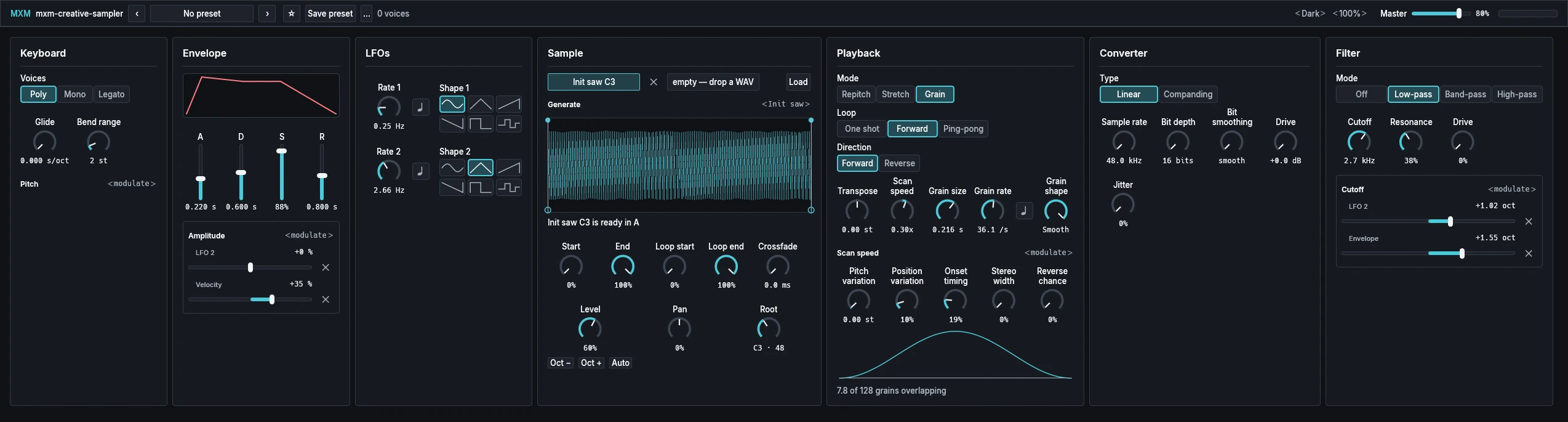
This manual goes through MXM Creative Sampler card by card. What every MXM editor shares, such as presets, pages, zoom, themes and the keys, is in Using the MXM editors. At its opening size the editor has two pages, and it opens on the one with the Sample card, since loading a sound comes first.

App bar
From the left: the plugin’s name, the preset row, a count of the voices playing, Theme and Scale, Master, and a level meter.
| Control | Range | Init |
|---|---|---|
| Master | 0% to 100% | 80% |
Master sets the instrument’s final level.
Keyboard
| Control | Range | Init |
|---|---|---|
| Voices | Poly, Mono, Legato | Poly |
| Glide | 0.000 s/oct to 5.000 s/oct | 0.000 s/oct |
| Bend range | 0 st to 24 st | 2 st |
Poly plays up to eight notes at once. When all eight are busy, the quietest released voice goes first, then the oldest one still playing. Mono plays one note at a time and every key restarts the sound. Legato does too, but a key played over a held one changes its pitch without restarting.
Glide is the time a Mono or Legato glide takes to cover one octave. Zero is off, and it does nothing in Poly. Bend range sets how far the pitch wheel moves a sounding note.
Pitch takes routes. None is there at Init.
Envelope
| Control | Range | Init |
|---|---|---|
| A | 0.000 s to 10.000 s | 0.220 s |
| D | 0.000 s to 10.000 s | 0.600 s |
| S | 0% to 100% | 88% |
| R | 0.000 s to 20.000 s | 0.800 s |
The amplitude envelope, drawn above its faders: attack, decay, the sustain level held while a key is down, and the release after it. The shortest time is 0.05 ms, which reads as 0.000 s.
Amplitude takes routes. At Init, Velocity is on it at +35 % and LFO 2 at +0 %, ready to be turned up.
LFOs
| Control | Range | Init |
|---|---|---|
| Rate 1 | 0.01 Hz to 40.00 Hz | 0.25 Hz |
| LFO 1 sync | Off, On | Off |
| Shape 1 | Sine, Triangle, Ramp up, Ramp down, Square, Sample & hold | Sine |
| Rate 2 | 0.01 Hz to 40.00 Hz | 2.66 Hz |
| LFO 2 sync | Off, On | Off |
| Shape 2 | Sine, Triangle, Ramp up, Ramp down, Square, Sample & hold | Triangle |
The sync buttons are the note symbols beside the rate knobs. With one on, its knob reads a note length from 1/32 to four bars. Both LFOs run freely, notes don’t reset them, and every voice hears the same value. Where an LFO is routed shows under the control it moves.
Sample
| Control | Range | Init |
|---|---|---|
| Layer A, Layer B | Choose a layer, or drop a file on it | A |
| × (Empty layer) | Button | |
| Load | Button | |
| Generate | 17 sources | Init saw on A |
| Start | 0% to 100% | 0% |
| End | 0% to 100% | 100% |
| Loop start | 0% to 100% | 0% |
| Loop end | 0% to 100% | 100% |
| Crossfade | 0.0 ms to 2.00 s | 0.0 ms |
| Level | 0% to 100% | 60% (A), 100% (B) |
| Pan | −100% to 100% | 0% |
| Root | 0 to 127, with cents | C3 · 48 (A), C4 · 60 (B) |
| Oct −, Oct + | Buttons | |
| Auto | Button |
The two chips at the top are the layers. Click one to select it, and the Sample and Playback cards show that layer. Drop a file on a chip or on the waveform, or use Load. The × beside a chip empties that layer while the other keeps playing. Generate replaces the selected layer with a sound the sampler makes itself: Init saw, Supersaw, Pulse sweep, Saw taper, Overtone triangle, Hollow to full, Formant glide, Two vowels, Phase drift, Stretched harmonics, Bell to tone, Drawbars, Tone to noise, Sideband sweep, Sync sweep, Unison spread or Glass.
The waveform shows the playhead and, in Grain mode, the grains as they play. Drag its handles to set Start, End, Loop start and Loop end. Start and End can pass each other and swap roles. Crossfade blends the loop’s end into its start so the loop doesn’t click. The line under the waveform reports loading, and says so when a file was refused and the layer kept its sound.
Root is the note that plays the sample at its recorded rate, shown as a name and number such as C3 · 48, with cents when there are any. Dragging moves it in whole notes, and Oct − and Oct + move it an octave, keeping the cents. Auto listens to up to 1.5 seconds from the start of the region and sets Root to the note it hears, leaving unpitched sounds alone, and a caption says what it heard. The rows from Start to Auto appear only while the layer holds a sample.
Loading files
WAV, AIFF, FLAC, ALAC, MP3, AAC in M4A and Ogg Vorbis load, recognised by their content; Opus doesn’t. The dialog and the hints on the panel still say WAV, but every format above can be dropped. A file is kept as stereo 16-bit audio, using its first two channels, and a mono file goes to both sides. A layer holds up to two minutes at 48 kHz. A file that is unsupported, empty, broken or too long is refused, and the layer keeps its sound.
A WAV with its own loop arrives looping, and in tune if the loop is a pitch. Otherwise Root comes from the end of the file name if that is a note, such as C3, or falls back to C4. The host saves the audio inside your project, so a song keeps working after the file is moved or deleted.
Playback
| Control | Range | Init |
|---|---|---|
| Mode | Repitch, Stretch, Grain | Grain (A), Repitch (B) |
| Loop | One shot, Forward, Ping-pong | Forward (A), One shot (B) |
| Direction | Forward, Reverse | Forward |
| Transpose | −24.00 st to 24.00 st | 0.00 st |
| Scan speed | −2.00x to 2.00x | 0.30x (A), 1.00x (B) |
| Grain size | 0.008 s to 1.000 s | 0.216 s (A), 0.090 s (B) |
| Grain rate | 0.5 /s to 200.0 /s | 36.1 /s (A), 14.0 /s (B) |
| Grain rate sync | Off, On | Off |
| Grain shape | Hard, Triangle, Smooth | Smooth |
| Pitch variation | 0.00 st to 12.00 st | 0.00 st |
| Position variation | 0% to 100% | 10% (A), 25% (B) |
| Onset timing | 0% to 100% | 19% (A), 25% (B) |
| Stereo width | 0% to 100% | 0% |
| Reverse chance | 0% to 100% | 0% |
Repitch plays higher notes faster and shorter, like tape. Stretch keeps pitch and length apart, so every note keeps the sample’s length. Grain plays the sample as a cloud of tiny overlapping grains. Loop plays once, loops in one direction, or loops back and forth.
Scan speed, in Stretch and Grain, is how fast playback moves through the sample: zero stands still, and below zero goes backwards. It takes routes, for the selected layer.
The rest is Grain mode. Grain size is each grain’s length and Grain rate how many start each second; its sync button reads a note length from 1/64 to a whole note. Grain shape runs from hard and clicky through a triangle to smooth, and harder is brighter. Pitch variation detunes each grain, Position variation takes each from a different part of the sample, and Onset timing makes them start unevenly, until they form a cloud. Stereo width spreads them, and Reverse chance is how often one plays backwards.
Under the grain controls the card draws the grain’s shape and says how many grains overlap, such as 7.8 of 128. The instrument has 256 grains, shared between the layers that are sounding, and one layer can use at most 128. Ask for more and the line turns into a warning. Controls for a mode the layer isn’t in are hidden, and the card keeps their room so nothing jumps.
Converter
| Control | Range | Init |
|---|---|---|
| Type | Linear, Companding | Linear |
| Sample rate | 48.0 kHz to 1.50 kHz (with a 48 kHz sample) | 48.0 kHz |
| Bit depth | 16 bits to 5 bits | 16 bits |
| Bit smoothing | smooth to stepped | smooth |
| Drive | +0.0 dB to +24.1 dB | +0.0 dB |
| Jitter | 0% to 100% | 0% |
The old-sampler stage, one per voice, after A and B are mixed. Type decides how the bit depth treats quiet sounds: Linear has even steps and a harsher grit, and Companding has finer steps for quiet sounds and a smoother grit.
Sample rate divides the loaded sample’s own rate by 1 to 32: the top of the sound goes and grit folds back in. Bit depth adds grainy noise, most audible in quiet passages, with 12 bits at about 15 % of its travel and 8 bits at halfway. Bit smoothing goes from smooth to stepped, for a bright buzz. Drive pushes the sound harder into the stage, and Jitter makes its timing unsteady.
At Init the converter leaves the sound bit for bit as it was. There is no dither.
Filter
| Control | Range | Init |
|---|---|---|
| Mode | Off, Low-pass, Band-pass, High-pass | Low-pass |
| Cutoff | 20.0 Hz to 22.0 kHz | 2.7 kHz |
| Resonance | 0% to 100% | 38% |
| Drive | 0% to 100% | 0% |
Band-pass keeps a thin, nasal band around the cutoff. Resonance adds emphasis at the cutoff, and Drive pushes the filter into saturation.
Cutoff takes routes. At Init, LFO 2 is on it at +1.02 oct and the Envelope at +1.55 oct.
Routes
There are five targets, each under its own control: Pitch on the Keyboard card, Amplitude on the Envelope card, Cutoff on the Filter card, and Scan speed A and Scan speed B on the Playback card, which shows the selected layer’s in Stretch or Grain. There are 11 sources:
- LFO 1 and LFO 2, one value for all voices
- Envelope, each voice’s amplitude envelope
- Velocity, measured down from the hardest note
- Key, the note after glide, measured from middle C
- Wheel (CC 1), Pressure (polyphonic, or channel pressure from a keyboard without it) and Bend
- Random, one value drawn for each note
- Layer A and Layer B, each layer’s own audio before its Level and Pan
Click ‹ modulate › under a target to add a source. It becomes a row named after the source, with a depth slider and a ×. The × removes the route but keeps its depth for when you add the source again. Each source can reach each target once. Amounts read in the target’s unit:
| Target | Full reach |
|---|---|
| Amplitude | ±100 %; from Key ±20 % per octave |
| Cutoff | ±4.00 oct; from Pressure ±2.00 oct; from Key ±1.00 oct per octave |
| Pitch | ±12.00 st, on both layers; from Key ±12.00 st per octave |
| Scan speed | ±1.00x; from Key ±0.20x per octave |
Amplitude routes multiply the envelope, and together they stay between silence and double. LFO 1 has its own reach on scan speed, +0.60x on A and −0.47x on B, so the two layers move apart. Routes from Layer A and Layer B run one sample late, which acts as a comb at audio rate.
At Init four routes are on: Amplitude from Velocity and from LFO 2, and Cutoff from LFO 2 and from the Envelope. Three more are stored but switched off, and come back at their depth when you add them: Cutoff from Pressure at +2.00 oct, and Scan speed A from LFO 1 at +0.46x and from LFO 2 at +0.18x. The presets Held pad and Drifting texture store Scan speed from LFO 1 the same way.
Playing notes
Mono and Legato remember up to 16 held keys. Let go of the top note of a trill and the voice falls back to the newest key still held without restarting, and a glide carries on from the pitch actually sounding.
MXM Creative Sampler reads the mod wheel (CC 1), pitch bend, channel and polyphonic pressure, and per-note tuning, volume and pan. MIDI CC 120 and CC 123 stop the notes but leave the controllers where they are. It reports no latency.