MXM Classic Verb manual
Source code on GitHub · Questions on Discord
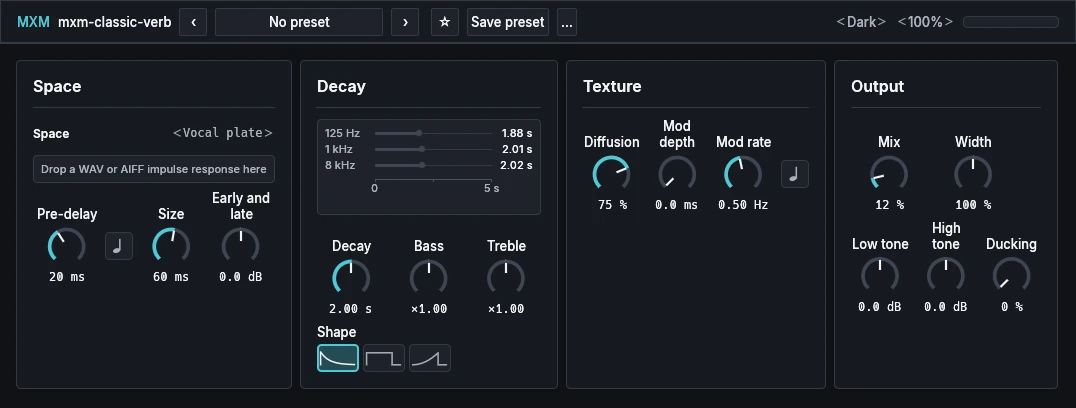
This manual goes through MXM Classic Verb card by card, then explains how to fit a space from your own impulse response. What every MXM editor shares, such as presets, pages, zoom, themes and the keys, is in Using the MXM editors.

App bar
Nothing beyond the shared preset row, Theme, Scale and a level meter whose clip light stays on until you click it. Mix is on the Output card.
Space
| Control | Range | Init |
|---|---|---|
| Space | 100 factory spaces, then Loaded | Vocal plate |
| Pre-delay | 0.0 ms to 500 ms | 20 ms |
| Pre-delay sync | Off, On | Off |
| Size | 2.0 ms to 300 ms | 60 ms |
| Early and late | −24.0 dB to +24.0 dB | 0.0 dB |
Space chooses the space: its early reflections, how its bands decay against each other, its tone and its width. Click it for the list. Changing it never moves a control, so the decay time and size you set stay as they are. The list starts with rooms, booths and ambiences, moves through chambers, halls and churches to the largest spaces, such as Canyon, Void and Cathedral nave, then has the drum rooms and the plates, and ends with the experimental ones: the sweeps, Frozen drone, Ice field and others. The last entry, Loaded, is the space you fitted from your own file (see Your own space). Until you have fitted one, Loaded sounds like the Init space. The line under the selector is where a file is dropped and where the fit reports back.
Pre-delay is the gap between the dry sound and the space’s first answer. The middle of its travel is 50 ms, so the short times get most of the knob. Pre-delay sync is the note symbol beside it. With sync on and a tempo from the host, the knob picks a note length from 1/64 to 1/4, the top the longest.
Size runs from a boxy room to past any building. Decay keeps its time when Size changes, so a bigger space rings no longer unless you raise Decay as well. Its travel is skewed too, with 50 ms at the middle.
Early and late balances the early reflections against the tail. At 0 dB they are as the space comes. At ±24 dB one part is silent and the other sits 12 dB up.
Decay
| Control | Range | Init |
|---|---|---|
| Decay | 0.10 s to 60.0 s | 2.00 s |
| Bass | ×0.10 to ×10.00 | ×1.00 |
| Treble | ×0.10 to ×10.00 | ×1.00 |
| Shape | Natural, Gated, Reverse | Natural |
The display draws three lines, for 125 Hz, 1 kHz and 8 kHz, at the decay times the reverb will give them. A gated or reverse shape is drawn as its envelope instead. The lines are brightest while the reverb is sounding. The display reads Off when Mix is at zero, and Nothing loaded when Loaded is chosen before you have fitted a space.
Decay is how long the reverb lasts in the middle band. The middle of its travel is 2 s. It shows two decimals below 10 s and one above. Bass and Treble set how long the low and the high end ring compared with the middle. ×1 is the space as it comes; above it that end rings longer, below it shorter. Both have the ×1 mark at the middle of their travel. A host lists them as Bass decay and Treble decay.
Shape is the row of three pictures. Natural fades away as a room does. Gated is a flat block of reverb that stops dead. Reverse swells up into a sudden stop. With Gated or Reverse, Decay sets the length of the shape.
Texture
| Control | Range | Init |
|---|---|---|
| Diffusion | 0 % to 100 % | 75 % |
| Mod depth | 0.0 ms to 4.0 ms | 0.0 ms |
| Mod rate | 0.05 Hz to 10.00 Hz | 0.50 Hz |
| Mod rate sync | Off, On | Off |
Diffusion sets how smooth the reverb is. Low settings leave distinct repeats; high ones blur them into a smooth wash.
Mod depth and Mod rate make the tail drift, which thickens it and blurs its pitch. At Init the depth is zero, so there is no drift until you raise it. The middle of the depth’s travel is 1 ms. Mod rate sync is the note symbol beside the rate. With it on and a host tempo, the rate knob picks a note length from 1/32 to 4 bars, the top the fastest.
Output
| Control | Range | Init |
|---|---|---|
| Mix | 0 % to 100 % | 12 % |
| Width | −100 % to 300 % | 100 % |
| Low tone | −24.0 dB to +24.0 dB | 0.0 dB |
| High tone | −24.0 dB to +24.0 dB | 0.0 dB |
| Ducking | 0 % to 100 % | 0 % |
Mix is the balance of dry sound and reverb. Init’s 12 % puts the Init space’s reverb about 16 dB under a sung phrase, a level for a vocal in a mix. At zero the effect is off: the dry sound passes to the bit, in mono and in stereo, and the reverb is emptied, so turning it up again starts from silence.
Width is the reverb’s stereo width. 100 % is the space as it comes, 0 % is mono, above 100 % is wider, and below zero left and right swap. Low tone and High tone raise or lower the reverb’s bass and treble. They work on the reverb only; the dry sound stays as it is.
Ducking lowers the reverb while the input plays, so it opens up in the gaps between phrases. At 0 % it does nothing.
Your own space
A space can be fitted from an impulse response of your own. There is no Browse button: you drag the file onto the card.
- Drag a WAV or AIFF file over the Space card. The line under the selector, which reads “Drop a WAV or AIFF impulse response here”, changes to “Release to fit a space to this file”, and the card is outlined.
- Let go. The line reads “Fitting a space to” and the file’s name. The current space keeps sounding while the fit runs. For a stereo response of a few seconds at 44.1 kHz it takes about a second or less, and up to about two seconds at 96 kHz.
- When the fit lands, Space moves to Loaded, and Decay, Size, Diffusion and Pre-delay take the fitted values. Bass and Treble go back to ×1, Early and late to 0 dB, Width to 100 %, Low tone and High tone to 0 dB, Mod depth to 0 and Shape to Natural. Mix, Ducking and Mod rate are never changed.
The line then says how well the fit went, for example “Confidence 0.82 · largest error 125 Hz tone −1.5 dB”. Below a confidence of 0.5 it reads “Low confidence” in the warning colour. Hover over the line for the full report.
The fit takes files ending in .wav, .wave, .aif, .aiff or .aifc, mono or stereo, at 22.05 kHz to 192 kHz, from 0.3 to 30 seconds long. A WAV may be 8- to 32-bit integer or 32-bit float. An AIFF may be 8- to 32-bit, and an AIFF-C uncompressed or float (NONE, twos, sowt, fl32 or fl64). Compressed AIFF-C and float WAVs other than 32-bit are refused by name. So is a file that can’t be read, is silent, has no clear start, has no decay above its noise, gives a confidence under 0.25, or needs more memory than there is. A refusal reads “Refused:” and the reason, and changes nothing.
Only the fitted space and its summary are saved, in your presets and in the project, never the audio file or where it was. The project opens on another computer without the file. Loading a factory preset picks one of the hundred spaces but keeps your fitted space under Loaded. A new drop, loading a preset, Init, the host restoring a project or closing the editor cancels a fit that is still running.
If a drop doesn’t take, please tell us which DAW you used.