MXM Chaos Drums manual
Source code on GitHub · Questions on Discord
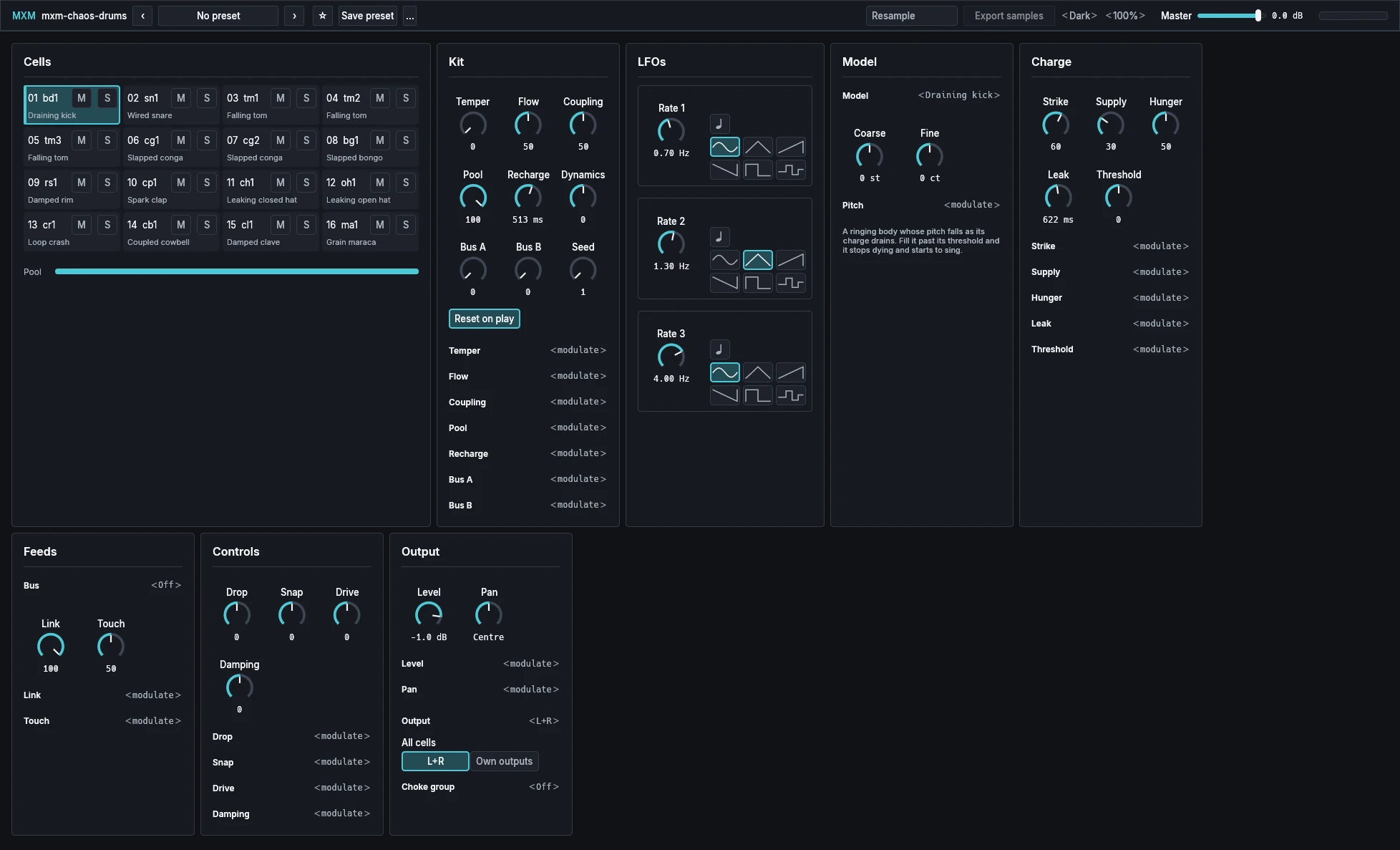
This manual goes through MXM Chaos Drums card by card. What every MXM editor shares, such as presets, pages, zoom, themes and the keys, is in Using the MXM editors. Cells, Kit and LFOs act on the whole kit. Model, Charge, Feeds, Controls and Output edit the selected cell. Amounts from 0 to 100 are percentages, shown without the % sign. Some ranges and default values aren’t final and may still change before 1.0.

App bar
Beyond the shared preset row, Theme and Scale, the bar holds Master, a level meter whose clip light stays on until you click it, and Resample with Export samples beside it. In a narrow window, Resample and Export samples move into the … menu.
| Control | Range | Init |
|---|---|---|
| Master | −60.0 dB to 6.0 dB | 0.0 dB |
| Resample | Off, On | Off |
| Export samples | Button |
Master is the level of the whole kit, on every output.
Resample plays every cell from a recording of itself, each struck once from rest, with synced LFOs at 120 BPM. While it is on, Level, Pan, Mute, Solo, the outputs, Dynamics and the choke groups still work. To change anything else, turn it off, edit, and turn it on again. No kit turns it on or off.
Export samples is grey until Resample is on. It asks for a folder and writes the kit there as numbered 24-bit WAV one-shots at 48 kHz, each cell at unity gain and centred. Each is a single hit from rest, so it leaves out what a cell’s history, neighbours, bus and touch would add.
Cells
A 4 × 4 grid, cell 1 at the top left and rows of four, with the Pool bar under it. These controls repeat on every square.
| Control | Range | Init |
|---|---|---|
| Cell (the square) | Button | |
| M (Mute) | Off, On | Off |
| S (Solo) | Off, On | Off |
Each square shows the cell’s number and name, its model, and its charge as a fill rising from the bottom. Click it to strike the cell at velocity 100 and select it. M silences a cell without stopping it: its charge and its neighbours carry on. S lets you hear a cell on its own and selects it. Any Solo silences the cells that are neither soloed nor muted, and Mute wins over Solo.
Lines across the edges show charge moving between cells, as heavy as the charge that crossed, with short stubs for the edges that wrap round. The Pool bar shows how much of the shared supply is left.
Names are made up from the model’s kind, numbered in cell order (bd1, tm1, tm2), and your DAW sees them on the keys.
Kit
| Control | Range | Init |
|---|---|---|
| Temper | 0 to 100 | 0 |
| Flow | 0 to 100 | 50 |
| Coupling | 0 to 100 | 50 |
| Pool | 0 to 100 | 100 |
| Recharge | 10 ms to 10.00 s | 513 ms |
| Dynamics | −100 to 100 | 0 |
| Bus A | 0 to 100 | 0 |
| Bus B | 0 to 100 | 0 |
| Seed | 1 to 9999 | 1 |
| Reset on play | Off, On | On |
Temper is how unpredictable the kit is. At zero every cell is a steady drum, with no flow, no coupling and no jitter. Turn it up and the cells sit near the edge where small differences grow, and feed each other. Flow is how fast charge moves from fuller cells to emptier neighbours, and Coupling how much of each cell’s sound reaches its neighbours. Both need Temper above zero.
Pool is the supply every held note and bus draws from at once. Lower it, and holding many notes makes the whole kit sag. Recharge is how fast it refills. Dynamics shapes how velocity answers: up brings soft hits up, down holds them back, zero is linear.
Bus A and Bus B are levels that power every cell set to them, with no note at all. Steady, they drone. Moved by a route, they feed and starve the cells.
Seed chooses the jitter and noise every cell plays: the same seed and the same notes play the same performance. A new seed applies at the next reset. Reset on play restarts every cell from rest when the host starts playing, so a bounce is what you heard.
LFOs
Three LFOs for the whole kit, one row each, which the cells and the kit use as route sources.
| Control | Range | Init |
|---|---|---|
| Rate 1 | 0.05 Hz to 20.00 Hz | 0.70 Hz |
| Rate 2 | 0.05 Hz to 20.00 Hz | 1.30 Hz |
| Rate 3 | 0.05 Hz to 20.00 Hz | 4.00 Hz |
| Sync (beside each rate) | Off, On | Off |
| Shape (beside each rate) | Sine, Triangle, Ramp up, Ramp down, Square, Sample & hold | Sine, Triangle, Sine |
Sync is the note button beside each rate. With it on, the knob picks a note length of the host’s tempo, from 1/32 to 4 bars, triplets and dotted values among them. Sample & hold takes a new random value on every cycle.
Model
This card and the ones after it belong to the selected cell, and repeat for each of the sixteen.
| Control | Range | Init |
|---|---|---|
| Model | 25 models | See the Init kit below |
| Coarse | −48 st to 48 st | See the Init kit below |
| Fine | −100 ct to 100 ct | 0 ct |
Model chooses which drum the cell is. Changing it while the cell plays keeps the charge, with a short fade over the jump. You can automate Model, but no route moves it. Coarse sets the pitch in semitones, four octaves either way, and Fine in cents. Pitch routes sit under them, and the text below describes the model.
The models are built from five engines, and each changes with the charge. Ring is a damped thud when low and a drone that holds itself up when full, its pitch drifting. Spark is silent, then ticks, then crackles, off any beat. Fold locks onto a tone, then steps, then breaks into noise. Loop plucks or rings like metal, and howls when full. Dust is sparse grit when low and dense hiss when full.
| Model | What it is |
|---|---|
| Draining kick | A body whose pitch falls as it drains; filled past its threshold, it sings |
| Wired snare | A drum body spilling into noisy wires, thicker the harder it rings |
| Leaking closed hat | Metal and noise that leak fast: a hit is a tick, a held note a hiss |
| Leaking open hat | The same, leaking slowly, ringing until a closed hat cuts it |
| Folded hat | Metal partials that break into noise when full and turn back into a tone as they drain |
| Falling tom | A ringing head whose pitch falls less far than the kick’s |
| Slapped conga | A ringing head with a slap; Body trades the slap for the tone |
| Slapped bongo | A smaller, higher conga |
| Damped rim | A short ring and a click; struck hard, it clicks twice |
| Damped clave | A high ring, damped short; filled past its threshold, it whistles |
| Spark clap | Sparks of noise that fire while the charge is high, slowing as it drains |
| Coupled cowbell | Two short rings pulling on each other; Coupling makes them beat |
| Loop cymbal | A loop of metal fed by noise, washing while full and thinning as it drains |
| Loop crash | A lower, wider loop with a burst of noise that washes out over seconds |
| Ringing ride | A steady loop with a bell over it; Body brings the bell up |
| Grain maraca | Seeds colliding: a held note shakes, a release patters out |
| Jingle tambourine | Grains shaking a loop of jingles |
| Scraping guiro | Ridges scraping a gourd; a held note is a long stroke |
| Coupled bell | Three long rings; filled past its threshold, it drones |
| Swept brush | Noise pushed by a held note: its length is the stroke, Supply its pressure |
| Raw ring | One ring: a thud when starved, a drone when full |
| Raw spark | Silence, then ticks, then crackle as it fills |
| Raw fold | A tone that locks onto steps as the charge rises and breaks into noise |
| Raw loop | A plucked loop that howls when full; Spread makes it metal |
| Raw dust | Noise as dense as the charge |
The Init kit, on the keys every factory kit keeps. Leak starts at each model’s own value, rounded here.
| Cell | Key | Model | Name | Coarse | Leak | Level |
|---|---|---|---|---|---|---|
| 1 | 36 | Draining kick | bd1 | 0 st | 622 ms | −1.0 dB |
| 2 | 37 | Wired snare | sn1 | 0 st | 373 ms | 3.0 dB |
| 3 | 38 | Falling tom | tm1 | −5 st | 537 ms | −1.5 dB |
| 4 | 39 | Falling tom | tm2 | 0 st | 537 ms | −1.5 dB |
| 5 | 40 | Falling tom | tm3 | 5 st | 537 ms | −1.5 dB |
| 6 | 41 | Slapped conga | cg1 | 0 st | 432 ms | 3.5 dB |
| 7 | 42 | Slapped conga | cg2 | 5 st | 432 ms | 4.0 dB |
| 8 | 43 | Slapped bongo | bg1 | 0 st | 278 ms | 6.0 dB |
| 9 | 44 | Damped rim | rs1 | 0 st | 86 ms | −1.0 dB |
| 10 | 45 | Spark clap | cp1 | 0 st | 432 ms | 2.5 dB |
| 11 | 46 | Leaking closed hat | ch1 | 0 st | 42 ms | 0.0 dB |
| 12 | 47 | Leaking open hat | oh1 | 0 st | 223 ms | −4.5 dB |
| 13 | 48 | Loop crash | cr1 | 0 st | 775 ms | 0.5 dB |
| 14 | 49 | Coupled cowbell | cb1 | 0 st | 179 ms | 1.5 dB |
| 15 | 50 | Damped clave | cl1 | 0 st | 86 ms | 1.5 dB |
| 16 | 51 | Grain maraca | ma1 | 0 st | 124 ms | −2.5 dB |
Every cell is equally loud per hit, except the hats and the maraca, 6 dB under the rest. The closed hat cuts the open one, as on a kit.
Charge
| Control | Range | Init |
|---|---|---|
| Strike | 0 to 100 | 60 |
| Supply | 0 to 100 | 30 |
| Hunger | 0 to 100 | 50 |
| Leak | 20 ms to 30.00 s | The model’s own |
| Threshold | −100 to 100 | 0 |
A note adds a packet of charge, Strike, scaled by velocity, so even a short trigger plays. Holding the note keeps pouring charge in at the rate Supply sets, which is also how fast the cell’s bus fills it. Sounding spends charge, and the higher Hunger is, the sooner loud hits die. Leak is how long the charge lasts at rest. It is never endless, so every cell comes to rest. Threshold moves the charge at which the drum changes character: lower, and it sings or crackles sooner.
A cell is one sound, not a set of voices, so repeated notes add charge to the same cell. An empty cell is silent and a full one may sustain itself.
Feeds
| Control | Range | Init |
|---|---|---|
| Bus | Off, A, B | Off |
| Link | 0 to 100 | 100 |
| Touch | 0 to 100 | 50 |
Bus lets Bus A or Bus B power the cell with no note. Link is how much the cell shares with its neighbours, the cells above, below, left and right, wrapping round at the edges: cell 1’s are 2, 4, 5 and 13. Flow and Coupling act only between neighbours, scaled by Temper and by each cell’s Link. Touch is how strongly the cell’s touch key acts.
Controls
The model’s own controls, three to a row. A model shows only the ones it reads, from two to six of them.
| Control | Range | Init |
|---|---|---|
| Tone, Body, Coupling, Drop, Spread, Grain, Snap, Drive, Spacing, Damping | −100 to 100 | 0 |
Zero is the model’s own setting. Either end reaches two and a half times the drum’s own span, out past where it stops being that drum. On a spark, a snare and a dust, Tone reaches less far up.
Tone is the balance of low and high. Body balances the model’s engines, such as a snare’s body against its wires, and the cowbell and the bell call it Coupling. Drop is how far the pitch falls as the charge drains. Spread sets the inharmonic ratios of hats, bells and cymbals, and Grain how dense the sparks and dust are. Snap is the attack, Drive how hard the engines are pushed, and Damping how fast a resonance dies, apart from the charge. Spacing appears only on the clap and the guiro.
If a route is aimed at a control the new model doesn’t read, its row is marked “(unused)” and moves nothing. Remove it to free the slot.
Output
| Control | Range | Init |
|---|---|---|
| Level | −60.0 dB to 6.0 dB | See the Init kit |
| Pan | L 100% to R 100% | Centre |
| Output | L+R, 1 to 16 | L+R |
| All cells | L+R, Own outputs | L+R |
| Choke group | Off, 1 to 16 | Off (cells 11 and 12: 1) |
Output sends the cell to the main stereo pair or to a mono output of its own, which your DAW sees as Cell 01 to Cell 16. All cells sets all sixteen at once, and lights neither choice when they differ. In a DAW that only takes stereo, every cell plays through the main pair. Output belongs to the instance in your project, so no kit changes it.
Cells in the same Choke group cut each other, as a closed hat cuts its open one. A cut cell latches: it takes no flow, coupling or bus, and stays empty until its own next strike or touch, or a reset. Choke groups are part of the kit, so presets carry them.
Routes
Every route is a row under the knob it moves. Click ‹ modulate › under a knob to add a source. It becomes a row such as “Drop from LFO 1”, with an amount slider and a × that removes it. Removing a route keeps its depth, so adding the source back brings it back.
| Control | Range | Init |
|---|---|---|
| Amount (each route) | −100 to 100 | 0 |
Each cell has four routes, from LFO 1, LFO 2, LFO 3, Wheel, Pressure, Velocity and Random, to Pitch, the model’s own controls, Strike, Supply, Hunger, Leak, Threshold, Link, Touch, Level and Pan. The kit has four more, from the three LFOs, Wheel and Pressure, to Temper, Flow, Coupling, Pool, Recharge, Bus A and Bus B.
| Target | Full reach |
|---|---|
| Pitch | 12 semitones |
| Leak, Recharge | four octaves of time |
| Every other target | its whole range |
Routes on the same target add, and the target’s range limits the sum. Velocity is the last hit’s, zero at the hardest. Random is one draw per hit from the cell’s seeded stream, so it repeats with the Seed. Wheel and Pressure take the highest any channel holds. Init has no routes.
Playing
Cell keys 36 to 51 strike cells 1 to 16, and touch keys 52 to 67 touch them, on every MIDI channel. Holding a touch key puts a hand on the cell: it feeds the cell’s sound back into its charge, bridges it to its neighbours and adds a faint noise and hum, like skin. Velocity sets how firm the touch is, and channel pressure scales every touch. A held note keeps feeding its cell, so note length changes the sound.
MIDI CC 120 silences the kit and latches every cell, so a bus can’t bring a drone straight back. CC 123 releases every held note. A CLAP host’s per-note tuning on a cell key tunes that cell until its next strike. There is no pitch bend, no step sequencer, no audio input, no built-in effect and no randomise button. An unfed kit comes to rest, and with no LFO routed it lets the host put it to sleep.