Download
The MXM collection is in beta on Windows, macOS and Linux. You install it with MXM Portal, which downloads the plugins and MXM Player, keeps them up to date and holds your key. The beta is free, and the key is on this page.
Windows
64-bit Windows 10 or 11.
mxm-portal.exe
macOS
macOS 11 or later, on Apple silicon or Intel.
mxm-portal-macos-universal.zip
Linux
x86-64 Linux with glibc 2.31 or newer: Ubuntu 20.04, Debian 11 and later releases, and current Fedora and Arch.
mxm-portal-linux-x64.tar.gz
The beta key
MXM-HDYHU-48J2F-WZXAB-BTQ8M-CMGNX
Paste it as it is. Case, spaces and dashes make no difference. The key has no end date and works for as long as the beta runs. When the beta ends, everything you installed keeps working. MXM Portal just stops installing and updating with this key.
Installing on Windows
- Run
mxm-portal.exe. The beta isn’t signed yet, so Windows SmartScreen shows “Windows protected your PC”. Choose More info, then Run anyway. - Choose Set up. Windows asks once whether MXM Portal may make changes to your device. Choose Yes, and it creates the plugin folders and installs Microsoft’s Visual C++ runtime.
- Tick the formats your DAW uses, VST3, CLAP or both (both start ticked), and choose Continue.
- Paste the beta key and choose Activate.
- Choose Install all in the top bar.
Then rescan plugins in your DAW. The MXM plugins sit in an MXM folder inside Windows’ own VST3 and CLAP folders.
Installing on macOS
MXM Portal isn’t notarised by Apple during the beta, so macOS stops it the first time you open it. Steps 2 to 5 let it through, once. Twice on the way, the blue button macOS offers is Move to Bin, which deletes the app, so read the buttons before you click. On a Mac set to American English it says Move to Trash.
- Double-click
mxm-portal-macos-universal.zipin your Downloads folder, then open MXM Portal beside it. Safari usually unpacks the zip by itself, and then MXM Portal is already there. - macOS says “MXM Portal” Not Opened, because Apple could not verify it. Choose Done, not the blue Move to Bin.
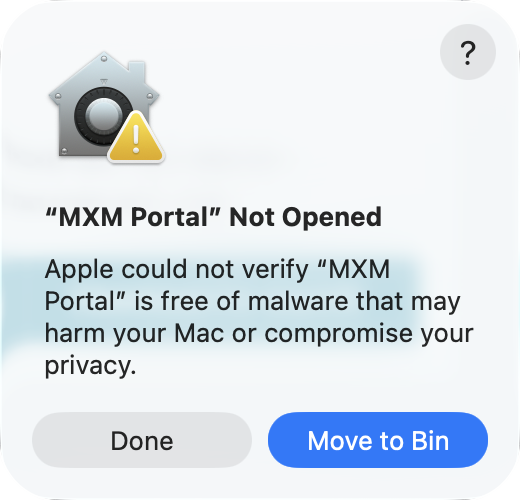
Step 2: choose Done. - Open System Settings, then Privacy & Security, and scroll down to Security. Beside “MXM Portal” was blocked to protect your Mac, choose Open Anyway. On macOS 11 and 12 it is in System Preferences, under Security & Privacy.
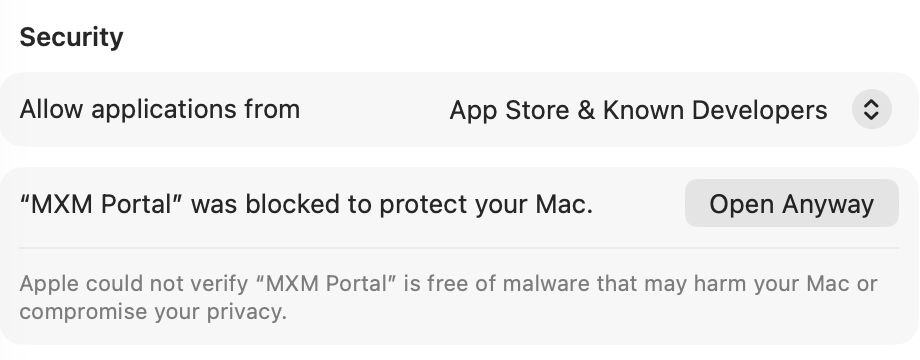
Step 3: Open Anyway, in System Settings. - macOS asks once more, Open “MXM Portal”? Choose Open Anyway, the middle of the three buttons. The blue one at the top is Move to Bin again.
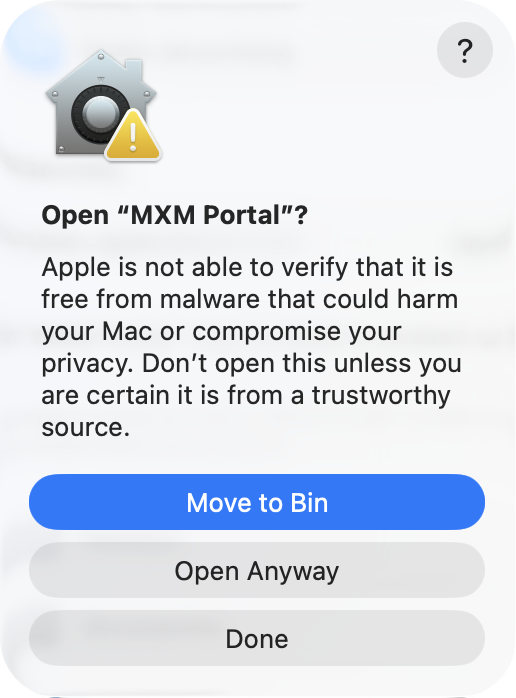
Step 4: choose Open Anyway, the middle button. - Confirm with your password or Touch ID.
- MXM Portal opens and asks which formats your DAW uses, VST3, CLAP or both (both start ticked). Choose Continue.
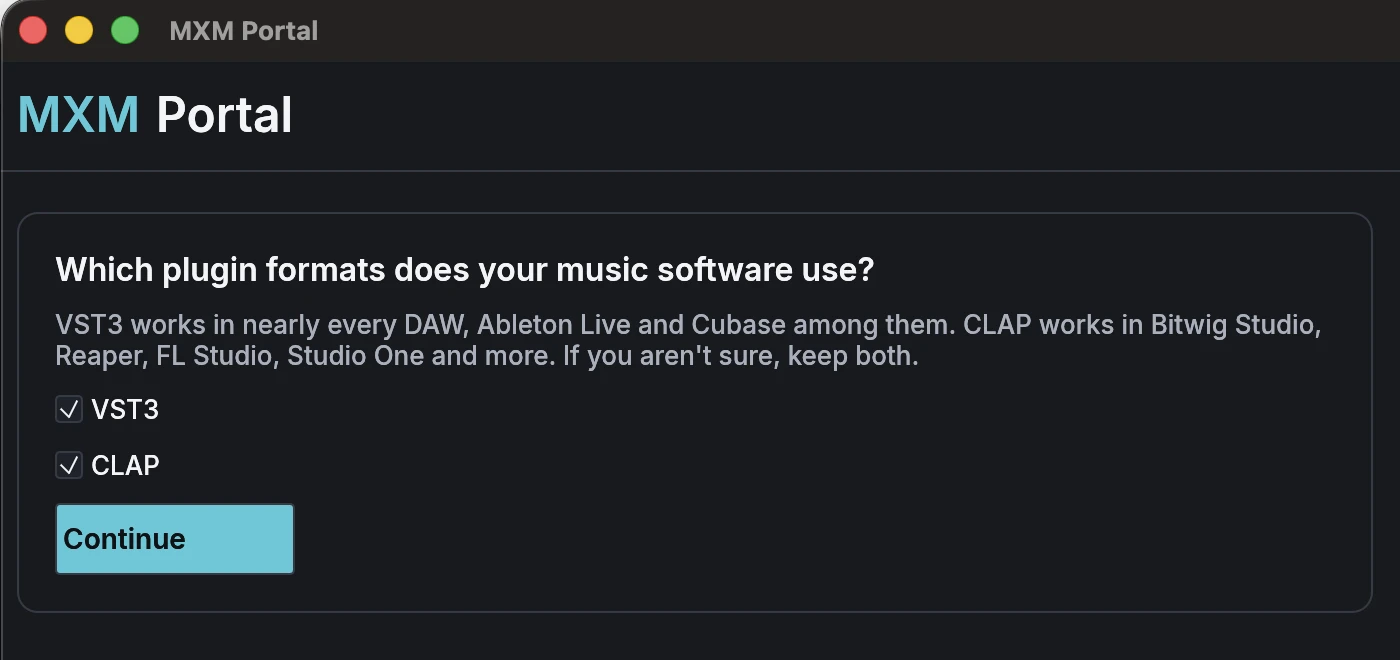
Step 6: MXM Portal is through. - Paste the beta key and choose Activate.
- Choose Install all in the top bar.
MXM Portal has copied itself into the Applications folder in your home folder, ~/Applications, so you never go through steps 2 to 5 again. Start it from Launchpad or Spotlight. In Finder it is in your home folder’s Applications, not the main Applications folder. The plugins and MXM Player it installs open without any of these steps.
Then rescan plugins in your DAW. The MXM plugins sit in ~/Library/Audio/Plug-Ins/CLAP/MXM and ~/Library/Audio/Plug-Ins/VST3/MXM, and MXM Player goes in ~/Applications, beside MXM Portal.
Installing on Linux
- Extract
mxm-portal-linux-x64.tar.gz. It holds one program,mxm-portal. - Start it from your file manager, or from a terminal with
./mxm-portal. On its first start it copies itself to~/.local/binand adds MXM Portal to your app menu. Everything goes in your own folders, so nothing asks for a password. - Tick the formats your DAW uses, VST3, CLAP or both (both start ticked), and choose Continue.
- Paste the beta key and choose Activate.
- Choose Install all in the top bar.
Then rescan plugins in your DAW. The MXM plugins sit in ~/.clap/MXM and ~/.vst3/MXM, and MXM Player gets its own entry in the app menu.
What it takes
Each product also has its own Install, Update or Remove button, if you’d rather pick. Only the formats you ticked are downloaded. The macOS builds hold code for both Apple silicon and Intel, which is why they are larger:
| Download | On disk | |
|---|---|---|
| Windows, one format | about 286 MB | about 470 MB |
| Windows, both formats | about 398 MB | about 730 MB |
| macOS, one format | about 395 MB | about 700 MB |
| macOS, both formats | about 610 MB | about 1.2 GB |
| Linux, one format | about 306 MB | about 515 MB |
| Linux, both formats | about 436 MB | about 815 MB |
Afterwards
Start MXM Portal from the Start menu on Windows, from Launchpad or Spotlight on macOS, or from the app menu on Linux, to fetch updates. It updates itself too, and offers Restart when a new version of the portal is ready. Settings, at the top right, changes the formats, and it is also where you find Remove MXM Portal….
What the beta holds
All 25 plugins of version 1.0, 14 instruments and 11 effects, plus MXM Player and MXM Impulses, the impulse responses MXM FX Convolution comes with.
The plugins are done and tested. The beta is for finding what we missed, on more computers and in more DAWs than ours. It runs on Windows, macOS and Linux.
Something wrong?
Write to maxm@mxm.dk or post on our Discord server with the plugin, your DAW and what happened. A preset or a small project that shows the problem helps most.