 Installer
Beta
MXM Portal
The one program you install by hand. It fetches the rest of the collection and keeps it up to date.
What it does
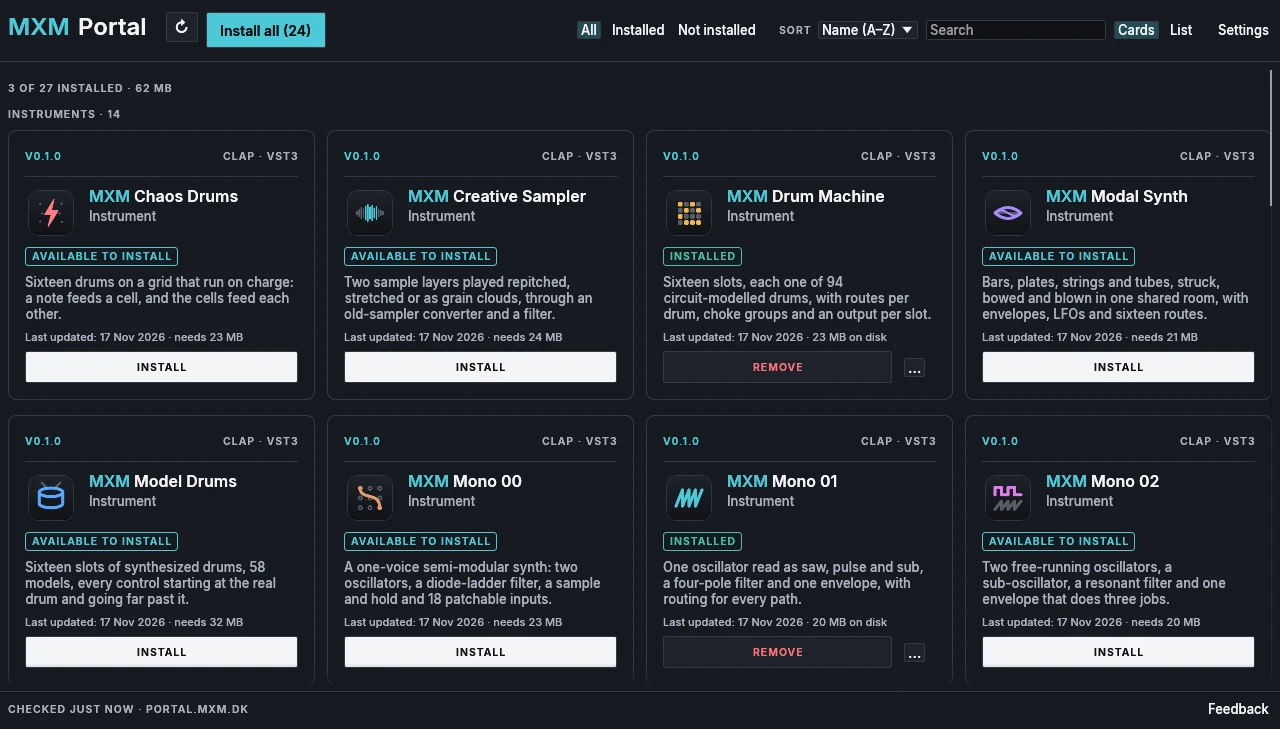
Everything in the collection comes through MXM Portal: the 25 plugins, MXM Player and the sound libraries some of the plugins use. Its window lists them in groups, instruments first, then effects, then apps and sounds. Each product gets a card with its status, its size on disk and a button that says what it can do next: Install, Update or Remove. Install all in the top bar takes everything at once.
Formats
You choose VST3, CLAP or both the first time you set it up, and the portal downloads only those. Settings, at the top right, changes the choice later. The plugins go into an MXM folder inside the VST3 and CLAP folders where DAWs look for them: Windows’ own, VST3 and CLAP in ~/Library/Audio/Plug-Ins on macOS, or ~/.vst3 and ~/.clap in your home folder on Linux.
The key
The portal asks for your key once. The key decides what the portal may install and update. The plugins never check it, so once something is installed it runs without the portal and without an internet connection. During the beta the key is free, and it is printed on the download page.
From a terminal
The same program has a command line for scripts and for people who prefer one: mxm-portal status, list, activate <key>, install <product> or install all, update, remove <product> and formats vst3|clap|both. keep <product> <version> holds a product at an older version, for a project that was made with it. Add --json for output a script can read. On macOS the program sits inside the app, as ~/Applications/MXM Portal.app/Contents/MacOS/mxm-portal.
Status
MXM Portal is in beta and runs on Windows, macOS and Linux. It updates itself, and offers Restart when a new version is ready. The Windows version isn’t signed yet, and the macOS version isn’t notarised by Apple, so the first start takes one extra step on each: the download page shows it.