 Plugin host
Beta
MXM Player
One instrument, up to eight effects and a step sequencer in a single window. For trying a sound or writing a loop without opening a DAW.

What it is
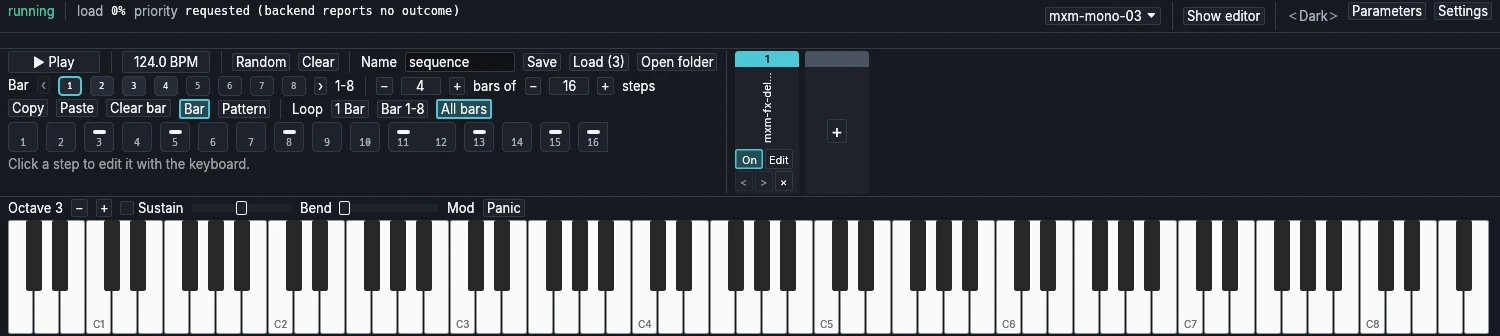
MXM Player is a small host for the MXM plugins. It loads one instrument and puts up to eight effects after it, in one chain. Choosing an instrument opens its own editor in a separate window. It can load other makers’ CLAP and VST3 plugins too, as long as an instrument has no audio input and an effect has one input and one output.
It isn’t a DAW. You work in loops of up to eight bars at a time, and when a loop is good, you take it to your DAW as audio, as MIDI or as a project.
Playing
There are three ways to play: the keyboard along the bottom of the window, your computer’s keyboard laid out like a piano (A to ’ for the white keys, W to P for the black ones, Z and X for octaves), and any MIDI keyboard you connect. Notes that arrive over MIDI light up on the on-screen keyboard, so it doubles as a monitor. Sustain, Bend, Mod and Panic sit beside it.
The sequencer
A sequence is bars of 1 to 16 steps. A step is a rest, a note, a tie that holds the note before it, or a slide. Click a step, play a key to set its pitch, click again to make the note longer, and press Escape when you’re done. Random fills the bar you’re looking at with a line in C Dorian, which is a quick way to hear an instrument without playing anything. Tempo runs from 20 to 300 BPM. Space starts and stops it, always from step 1.
Parameter locks
Select a step and turn any knob, in the instrument’s own editor, in the player or on a mapped hardware controller, and that step now sets it. You hear the change as you make it. Double-click the knob to put the step back to the patch. Up to 32 parameters can be locked at once, effects’ parameters included. Locks remember which instrument they were made for, and wait if you load a different one.
Effects
The chain shows as narrow strips to the right of the sequencer, one per effect, in signal order. Each strip turns its effect on or off, opens its editor, moves it earlier or later, or removes it. The player itself shows no effect parameters, since each effect’s editor is where they are. The chain and the sequence come back the next time you start the player.
Saving and exporting
Save offers three formats:
- Audio (.wav): the sequence rendered through every effect that is on, with all its locks, as a 32-bit float file at the current sample rate. Normalising to 0 dBFS is on unless you turn it off. To keep a reverb tail, add empty bars at the end.
- MIDI sequence (.mid): the notes, for any DAW. MIDI has no room for locks, and the player tells you so when you save.
- Project (.tutti): the instrument, its effects with their settings, and the sequence, as a tutti project, an open format for music projects.
Files go to the player’s exports folder, and Open folder shows it.
From a terminal
mxm-cli comes with the player and talks to it while it runs, over a connection that stays on your computer. It can load an instrument, write steps and locks, add effects, set the tempo, play and stop, export, and read back the player’s whole state as JSON. That makes MXM Player something you can hand to a script, or to an AI assistant, and let it build a loop.
Status
Beta, version 0.1.0, installed by MXM Portal on Windows, macOS and Linux. It needs Direct3D 12, Vulkan or Metal. Plugins run inside the player, so a plugin that crashes takes the player down with it. There is no audio input and no live recording.